Google’s new Googlebook laptops went on sale in the US on October 4, 2026, with prices starting at $899. They look like premium laptops, with OLED screens and aluminum bodies. But under the hood they run Googlebook OS, which is built on Android, not Windows or macOS.
That’s the one thing every remote worker needs to understand before buying a Googlebook for work. A Googlebook isn’t a cheaper Windows laptop. It’s a different kind of computer, and whether it works for you depends almost entirely on the apps your job relies on.
We went through the early reviews and compatibility reports to answer the questions that actually matter for work. Here’s what we found.
Googlebook for work: the 30-second answer
A Googlebook can be your main work laptop if most of your day happens in Google Workspace, a web browser, and popular Android apps. It’s a risky choice if your job depends on Windows desktop software, Excel macros, Outlook add-ins, or company-managed devices. And to get the best phone features, you’ll need a newer Android phone.
Googlebook work app checklist
| Work task | Does it work? | What early reports found |
|---|---|---|
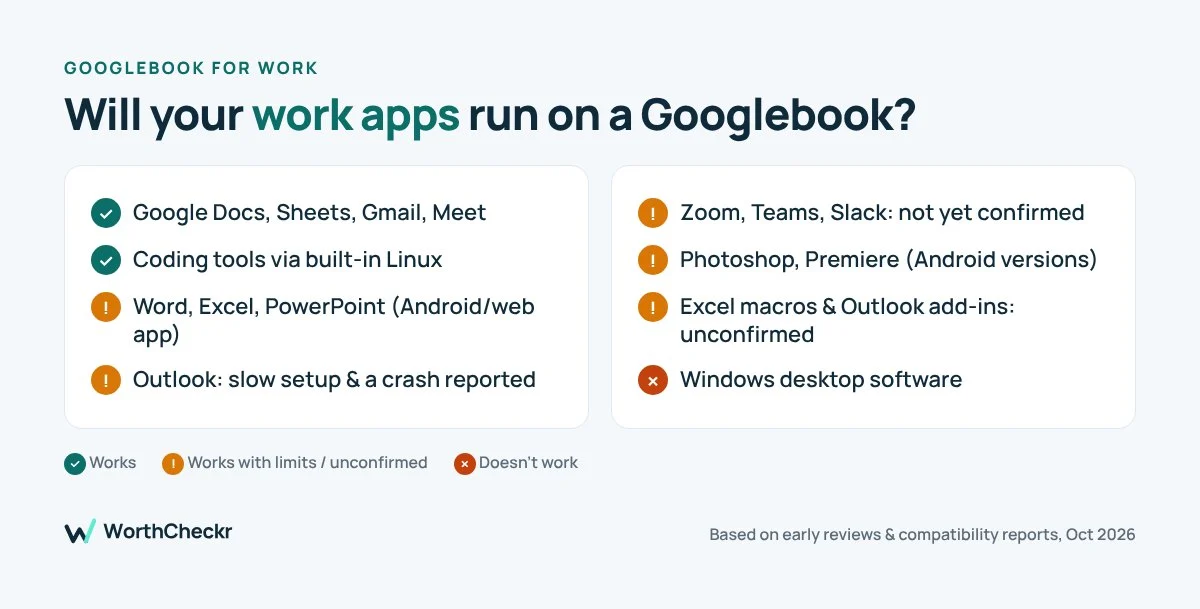
| Google Docs, Sheets, Gmail, Meet | Yes | Google’s own apps are the platform’s strongest point |
| Word, Excel, PowerPoint | Yes, with limits | Runs through Microsoft’s Android app and the web, not full desktop Office |
| Outlook | Works, with issues | PCWorld’s reviewer had slow setup, repeated sign-ins and a crash |
| Excel macros, Outlook add-ins | Unconfirmed | Wait for detailed testing before relying on them |
| Windows desktop software | No | Googlebooks don’t run Windows programs |
| Zoom, Teams, Slack | Not yet confirmed | Not covered in early compatibility testing, so check before you buy |
| Adobe Photoshop, Premiere | Partly | Android versions are available, without full desktop features |
| Coding and developer tools | Yes, via Linux | A built-in Linux terminal runs Debian tools |
| Using phone apps on the laptop | Yes, with the right phone | Needs an Android 17 phone on the same account and Wi-Fi |
1. Googlebook and Microsoft Office: it works, but it isn’t desktop Office
Google says you can open, edit and save Word, Excel, Outlook and PowerPoint files using Microsoft’s app, with extra features unlocked by a Microsoft 365 subscription. The catch is that this is the Android and web version of Office, not the full desktop software.
For everyday documents, emails and slide decks, that’s usually fine. But Windows Forum notes that if your work relies on Excel macros, Outlook add-ins or company software built for Windows, you should wait for real-world testing before switching. One more tip: Microsoft has renamed its Microsoft 365 Android app to Microsoft Copilot, so search for that name in the Play Store.
2. Googlebook and Outlook: the weak spot so far
This is where the clearest early complaint appears. PCWorld’s Mark Hachman tried to set up his work Outlook account on a Googlebook. It took a long time, asked him to sign in again at every login, and then crashed. On his Windows laptop, the same account worked without issues. If your company runs on Outlook, test it before you commit, or use the Outlook web app as a backup.
3. Video calls and team chat
Early compatibility coverage hasn’t confirmed how Zoom, Microsoft Teams and Slack behave on Googlebooks yet. All three offer web versions and Android apps, so they should be usable, but “usable” and “reliable on a Monday morning call” are different things. Buy from a store with an easy return policy and try a real meeting in your first week.
4. Your phone matters more than you’d think
One of the Googlebook’s best ideas is letting you use your phone’s apps directly on the laptop, without installing them. But it has a strict requirement: an Android 17 phone signed into the same account and on the same Wi-Fi network.
PCWorld’s reviewer found that his Samsung Galaxy S23, a supported phone, couldn’t connect because it was still on Android 16. Windows’ Phone Link, by comparison, works with phones running Android 10 or later. If you use an iPhone, these phone features won’t help you at all.
5. The AI features: one standout, some misses
Reviewers were mixed on the built-in AI tools:
- Rambler dictation was the clear winner. PCWorld’s reviewer said it strips filler words, adds punctuation and breaks up sentences, which makes it great for drafting emails by voice.
- Magic Pointer, which identifies what’s on screen, took close to a minute to respond in the same review.
- Gemini-made widgets worked some of the time, but a widget for priority emails failed.
6. Performance and comfort for long days
The hardware varies a lot by brand, so pick carefully. PCWorld found the Lenovo Googlebook 15 felt choppy with 16GB of memory when running two displays, several apps and multiple Chrome tabs, and called its keyboard surprisingly poor. If you’re a heavy multitasker, consider a model with more than 16GB of memory.
Which Googlebook is best for work?
| Model | Starting price (US) | Screen | Worth knowing |
|---|---|---|---|
| Acer Googlebook 14 | $899 | 14-inch OLED, 120Hz | Cheapest way in |
| Dell XPS Googlebook | $999 | 13.4-inch IPS, 120Hz | Compact and light, solid battery |
| Lenovo Googlebook 15 | $1,099 | 15.3-inch OLED | Biggest screen, but keyboard criticized |
| Asus Googlebook 14 (CX9) | $1,199 | 14-inch OLED, 120Hz | Longest quoted battery life, good ports |
| HP Googlebook 14 | $1,199 | 14-inch OLED, 120Hz | Face unlock, up to 32GB memory |
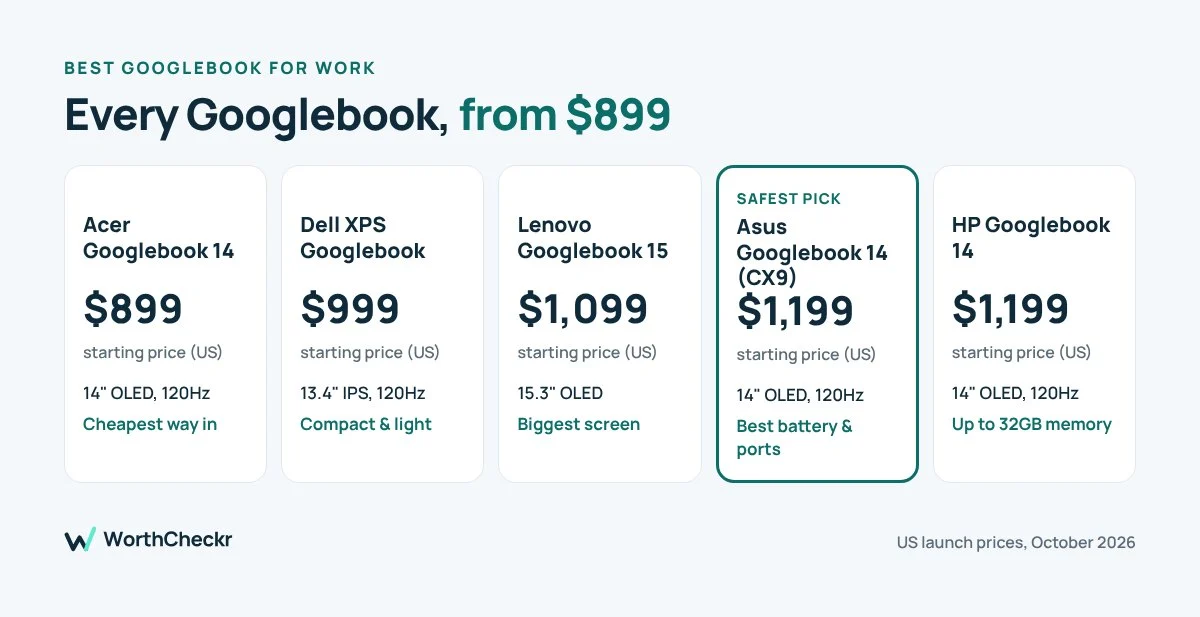
For most home office workers, the Asus Googlebook 14 looks like the safest pick, thanks to its battery life and ports. If you’re on a budget, the Acer Googlebook 14 gets you the same screen size and an OLED panel for $300 less.
Googlebook vs Windows laptop: a quick test for your job
Answer these five questions honestly:
- Do I use any software that only runs on Windows or Mac?
- Does my company manage my laptop with tools like Intune?
- Do I rely on Excel macros or Outlook add-ins?
- Is my phone an iPhone, or an Android phone that won’t get Android 17 soon?
- Do I work with 20+ browser tabs and multiple monitors all day?
If you answered yes to any of the first three, stick with Windows or a Mac for now. If you answered yes to question 4 or 5, a Googlebook can still work, but you’ll miss some features or need a higher-memory model.
Need full Windows apps in something just as portable? See how the Surface Pro 12-inch 2nd Edition holds up for work.
Googlebook for work FAQ
Can a Googlebook run Windows apps?
No. Googlebooks run Android apps, web apps and Linux tools. They don’t run Windows desktop software.
Can I use Microsoft Office on a Googlebook?
Yes. You can open, edit and save Word, Excel, PowerPoint and Outlook files through Microsoft’s Android app or the web. It isn’t the full desktop version, so some advanced features may be missing.
Do I need an Android phone to use a Googlebook?
No, but the best phone features, like using your phone’s apps on the laptop, need an Android 17 phone.
Is a Googlebook the same as a Chromebook?
No. Googlebooks run Googlebook OS, which is built on Android and focuses on Android apps and phone integration.
What is the cheapest Googlebook?
The Acer Googlebook 14, starting at $899 in the US.
Our verdict: is a Googlebook good for work?
Googlebooks are the most interesting new laptops of the year, and some of their ideas, like Rambler dictation, are genuinely useful for work. But they’re a first-generation platform. If your job lives in Google Workspace and the browser, a Googlebook can be a great, good-looking work machine. If it depends on Windows software or Outlook working perfectly every day, wait a few months for more real-world reports.
Sources: PCWorld: Googlebook vs Windows · The Gadgeteer: app compatibility · Windows Forum: Office on Googlebook · Googlebook FAQ · Tech Advisor: every Googlebook compared · Notebookcheck: HP Googlebook 14 · Wikipedia: Googlebook