Microsoft’s smallest Surface got a second edition on October 13, 2026, and it costs a lot more than the first one. The starting price jumped from $799.99 to $1,149.99. So before you put one on your home office desk, it’s worth asking a simple question: what is the Surface Pro 12-inch 2nd Edition for work actually like, every single day?
The good news is we don’t have to guess. The 12-inch design hasn’t changed since the first edition launched in 2025. Only the chip, memory and screen brightness are new. That means a year of expert reviews still applies to how it types, carries and holds up. We read through those reviews, plus the first hands-on reports of the new model, so you can decide with your eyes open.
The short version
It’s a superb grab-and-go Windows tablet that is silent, light and lasts all day. As your only work computer, it has real compromises: a small screen, a keyboard that costs extra, and only two ports. Pair it with a monitor and a USB-C dock and most of those problems go away.
What changed in the Surface Pro 12-inch 2nd Edition
| Surface Pro 12-inch (2025) | Surface Pro 12-inch 2nd Edition (2026) | |
|---|---|---|
| Starting price | $799.99 | $1,149.99 |
| Chip | Snapdragon X Plus (8-core) | Snapdragon X2 Plus (6-core, 80 TOPS NPU) |
| Memory | 8GB or 16GB | 16GB or 24GB |
| Screen brightness | 400 nits | 500 nits |
| Battery (Microsoft’s web browsing rating) | About 12 hours | Up to 13 hours |
| Design, screen size, ports | 12-inch, 2x USB-C | Unchanged |
One detail that softens the price jump: the cheap 8GB model is gone. Gagadget points out that on a like-for-like 16GB setup, the real increase is closer to $100 than $300. If you’d have bought 16GB anyway (and for work, you should), the new model isn’t as big a price leap as the headline suggests.
What reviewers loved: battery life, silence and portability
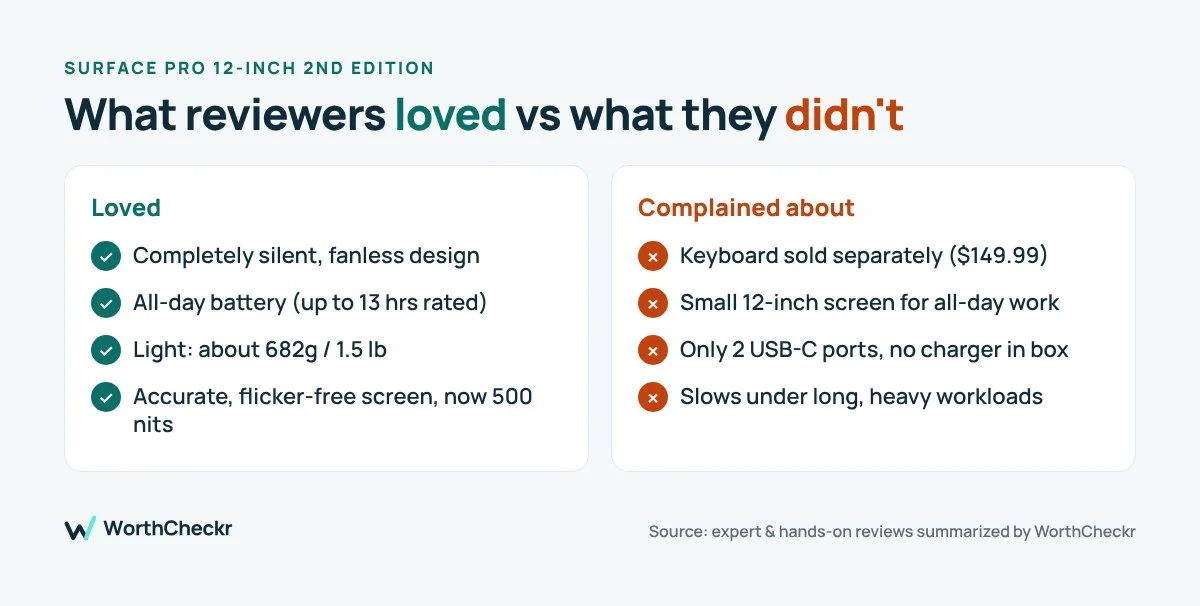
It’s completely silent. There’s no fan inside. Notebookcheck called it “finally a silent Snapdragon 2-in-1,” and Tom’s Guide’s early hands-on with the new model found the back stayed cool even while running Blender, Photoshop and a sketching app together, with no stutter when switching between them. For anyone who takes calls in a quiet room, a silent machine is a genuine quality-of-life upgrade.
The battery goes the distance. TechRadar’s looped video test on the first edition ran for 17 hours and 49 minutes, and the reviewer gave battery life full marks. Engadget’s reviewer still had around 30% left after a full workday. The new chip is rated for an extra hour on top, so a full day away from the charger looks very realistic.
It’s genuinely portable. The tablet alone weighs about 682g (around 1.5 lb) and is 7.8mm thick. Engadget’s reviewer admitted he forgot he was carrying it. If you split time between your desk, the kitchen table and a coworking space, this matters more than any spec.
The screen is accurate. Notebookcheck measured very accurate colors and found no PWM flicker, which is good news if you’re sensitive to screen flicker after long days. The 2nd Edition is also brighter, at 500 nits.
What reviewers complained about: keyboard, screen and ports
The keyboard is sold separately, and it’s not perfect. At $149.99, the keyboard feels like a required purchase, and Engadget called the separate pricing deceptive. Reviewers liked the typing feel but noted the keyboard can’t tilt up, the trackpad is small and loud, and the Alcantara-style back picks up dirt. Tom’s Guide also warned that the keyboard attaches only at the bottom edge, so it may feel wobbly on your lap.
The screen is small for all-day work. At 12 inches and 220 pixels per inch, TechRadar found text noticeably less sharp than on the larger Surface Pro, and the bezels look dated. It’s fine for email and documents. It’s cramped for side-by-side spreadsheets.
Only two ports, and no charger in the box. You get two USB-C ports and nothing else. There’s no headphone jack and no card reader, and Microsoft includes only a USB-C cable, so you need your own power adapter.
It slows down under sustained load. Notebookcheck found multi-core performance dropped by about 40% after a short burst. That’s the trade-off for being fanless. Quick tasks feel snappy, but long exports or heavy multitasking will take longer. TechRadar also saw some lag and occasional app crashes when pushing it hard.
The pen is easy to lose. The Slim Pen no longer stores inside the keyboard cover, which Notebookcheck flagged as a small but real annoyance.
The real cost of a home office setup
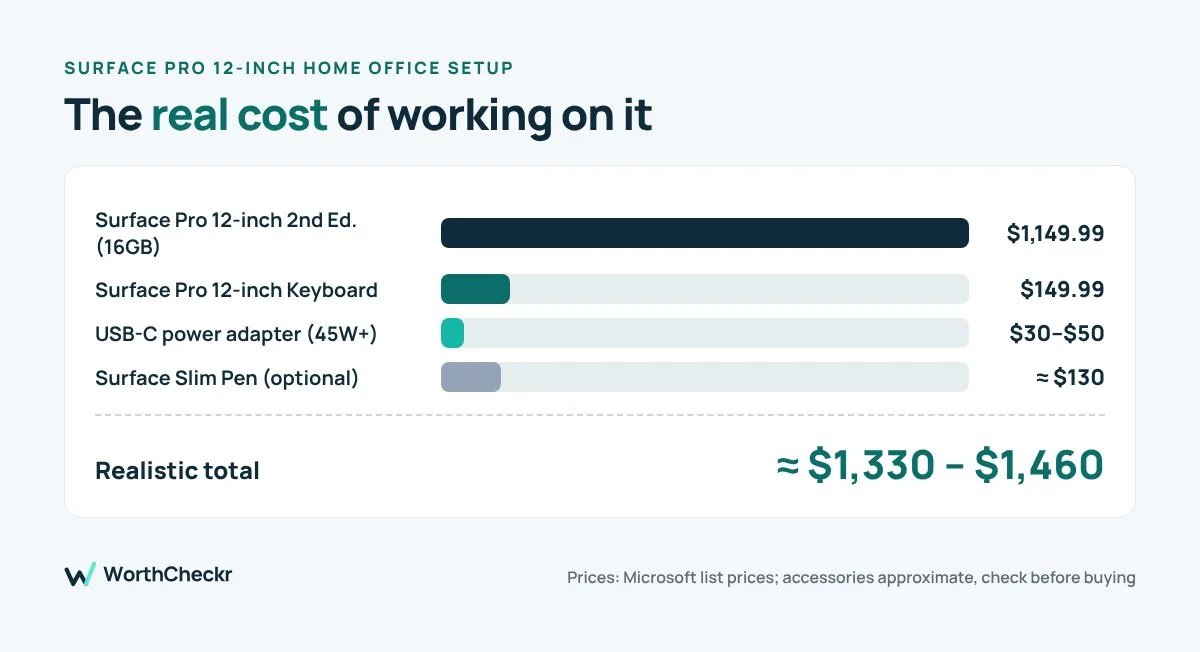
| Item | Approx. price | Needed? |
|---|---|---|
| Surface Pro 12-inch 2nd Edition (16GB) | $1,149.99 | Yes |
| Surface Pro 12-inch Keyboard | $149.99 | Yes, for typing |
| Surface Slim Pen | about $130 | Only for notes or sketching |
| USB-C power adapter (45W or higher) | $30–$50 | Yes, not in the box |
| Realistic total | about $1,330 to $1,460 |
Accessory prices are based on 2025 listings, so check current prices before you buy.
Accessories worth buying with it
- Surface Pro 12-inch Keyboard: essential if you type every day. Check price
- Surface Slim Pen: for handwritten notes, signing PDFs and sketching. Check price
- 65W USB-C charger: the Surface doesn’t include one, and 65W can charge your phone too. Check price
- USB-C hub or dock: adds HDMI, USB-A, Ethernet and a card reader. Check price
- 24- to 27-inch USB-C monitor: a bigger screen and charging through a single cable. Check price
Surface Pro 12-inch home office setup: make it your main computer
Most of the complaints above disappear once the Surface is docked at a desk. Here’s the setup we’d suggest based on what reviewers struggled with:
- Add an external monitor. It solves the small-screen problem instantly. A 24- or 27-inch USB-C monitor can also charge the Surface through one cable.
- Use a USB-C hub or dock. It fixes the two-port limit, adding USB-A, HDMI, Ethernet and a card reader.
- Use a full-size keyboard and mouse at your desk. Keep the Surface keyboard for travel. Your wrists will thank you.
- Raise the tablet on a stand. The kickstand works, but a stand puts the camera at eye level for video calls.
- Buy a 65W charger. It can power the Surface and your phone, which simplifies your desk.
Who should buy the Surface Pro 12-inch 2nd Edition
- You work from several places and want the lightest Windows machine you can get
- You take a lot of calls and want a completely silent computer
- You’ll use it docked to a monitor at home and as a tablet on the go
- You need full Windows apps, not just a browser
Who should skip it
- You want one laptop with a big screen and no accessories
- You edit video, run heavy spreadsheets, or push the processor for long periods
- You’re on a tight budget: last year’s model, if you can find it discounted, does most of the same job
Not tied to Windows desktop apps? Read our app-by-app guide: can a Googlebook replace your work laptop?
Surface Pro 12-inch 2nd Edition FAQ
Is the Surface Pro 12-inch 2nd Edition good for working from home?
Yes, especially if you dock it to a monitor. Reviewers praised its silent operation and long battery life. On its own, the small screen and two ports can feel limiting for full-day work.
Does the Surface Pro 12-inch come with a keyboard?
No. The keyboard costs $149.99 extra, and the Slim Pen is also sold separately.
How long does the Surface Pro 12-inch battery last?
Microsoft rates the 2nd Edition at up to 13 hours of web browsing. TechRadar’s video test on the 2025 model lasted almost 18 hours.
Can I connect the Surface Pro 12-inch to an external monitor?
Yes, through its USB-C ports. A USB-C monitor or dock is the easiest way to add a bigger screen and more ports.
Is the 2nd Edition worth it over the 2025 model?
If you need 16GB of memory, the real price difference is around $100, and you get a faster chip and brighter screen. If 8GB is enough for you, a discounted 2025 model is better value.
Our verdict: is the Surface Pro 12-inch 2nd Edition worth it for work?
The Surface Pro 12-inch 2nd Edition is the Windows equivalent of a great notebook: light, quiet and always ready. It isn’t a complete home office on its own, but with a monitor and a dock it becomes a flexible setup that travels well. Budget for the keyboard and charger from day one so the price doesn’t surprise you.
Sources: Gagadget: pricing and specs · Tom’s Guide hands-on · Notebookcheck review · TechRadar review · Engadget review · NewsBytes