WorthCheckr pick: FlexiSpot E7 Pro
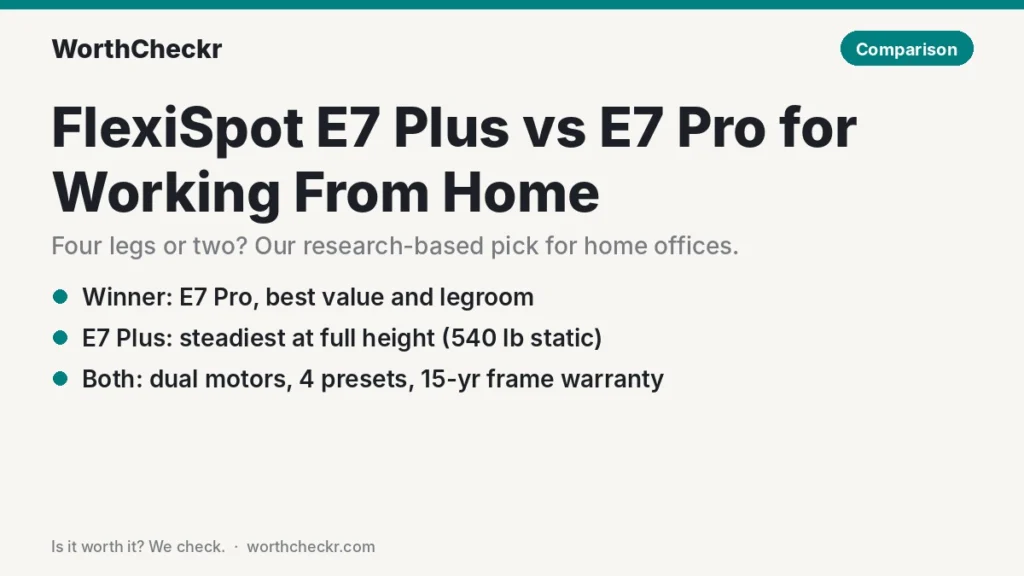
Our FlexiSpot E7 Plus vs E7 Pro call for most home offices.
✓ Worth it for remote workers who want a strong dual-motor desk with plenty of legroom at a price that leaves money for a good chair and monitor arm.
- It usually sells for about $100 less than the E7 Plus.
- Its 440 lb lifting rating matches the E7 Plus, so it handles heavy setups too.
- Rear-set legs leave more open space for your knees, chair and a walking pad.
- Reddit owners rate it slightly higher, and TechRadar names it the best standing desk overall.
Pick the E7 Plus instead if any wobble at standing height drives you mad, you’re tall and stand at full height, or your desk carries a big multi-monitor rig, a 3D printer or other gear that hates vibration.
Last updated October 23, 2026 · Research-based analysis by Abid Shehzad, WorthCheckr
FlexiSpot now has two desks near the top of most “best standing desk” lists, and they’re easy to confuse. In TechRadar’s October 14, 2026 update, the two-leg E7 Pro is the best standing desk overall and the four-leg E7 Plus is the pick for stability. If you’re comparing FlexiSpot E7 Plus vs E7 Pro for a home office, the real question is simple: is a four-leg frame worth roughly $100 more and less legroom?
We pulled together findings from TechRadar, Tom’s Guide, The Gadgeteer, GamingTrend, GameRevolution, GamesRadar+ and iMore, checked specs against FlexiSpot’s own product pages, and read what owners say on Reddit. WorthCheckr hasn’t tested either desk in person; this is a research-based comparison.
Still deciding what kind of desk you need? Our standing desk buying guide walks through motors, size, stability and budget, and links every WorthCheckr desk comparison.
In this comparison
- FlexiSpot E7 Plus vs E7 Pro: the quick answer
- FlexiSpot E7 Plus vs E7 Pro specs side by side
- Reviewer scorecard: who wins each round
- Where reviewers agree
- 2 leg vs 4 leg standing desk: stability at full height
- Where they differ: legroom, footprint and desk sizes
- Where they differ: noise and assembly
- Where they differ: price and value
- What buyers and owners are saying
- Our take: why the E7 Pro gets the edge
- Which FlexiSpot desk should you buy for working from home?
- Accessories for your FlexiSpot desk
- FlexiSpot E7 Plus vs E7 Pro FAQ
- Verdict
FlexiSpot E7 Plus vs E7 Pro: the quick answer
Both are dual-motor desks with 15-year frame warranties, four memory presets, a USB charging port, a child lock and anti-collision sensors. The split comes down to two legs or four.
Choose the FlexiSpot E7 Pro if…
- You want the best-value dual-motor desk FlexiSpot sells, especially during one of its frequent sales.
- Your setup is a laptop plus one or two monitors, a dock and the usual desk clutter.
- You want open space under the desk for your chair, a filing cabinet, a PC tower or a walking pad.
- You’re on the shorter side: it drops to 25 inches versus 26 for the E7 Plus.
Choose the FlexiSpot E7 Plus if…
- Stability is your top priority, and even a slight sway when you type at standing height bugs you.
- You’re tall and need the desk near its top height (it reaches 51.6 inches).
- You run heavy, vibration-sensitive gear: three monitors on arms, studio speakers, a 3D printer or a camera rig.
- You want the highest static load rating (540 lb) in this pair.
Check FlexiSpot E7 Pro price → Check FlexiSpot E7 Plus price →
FlexiSpot E7 Plus vs E7 Pro specs side by side
Here’s the FlexiSpot E7 Plus vs E7 Pro spec sheet. Specs come from FlexiSpot’s US product pages and blog. Where a reviewer measured something FlexiSpot doesn’t publish, we’ve said so.
| Spec | FlexiSpot E7 Plus | FlexiSpot E7 Pro |
|---|---|---|
| Frame | Four legs, 3-stage columns, linked by rods underneath | Two legs, “semi-C” frame set toward the back |
| Motors | Dual | Dual |
| Height range | 26″–51.6″ (standard frame) | 25.0″–50.6″ |
| Load rating | 540 lb static, 440 lb while lifting | 440 lb |
| Frame width | 38.9″–62.6″ | 43.3″–74.8″ |
| Desktop sizes | About 47″–80″ wide, 28″–35″ deep | 47.2″–80″ wide |
| Lift speed | Not published | About 1.57″ per second (FlexiSpot blog) |
| Noise | Not rated; Tom’s Guide measured 54 dB | Not rated; FlexiSpot says quieter than typing |
| Memory presets | 4 | 4 |
| Keypad extras | USB charging port, child lock | USB charging port, child lock |
| Safety | Anti-collision | Anti-collision |
| Warranty | 15 years on frame, motors and electronics; 2–5 years on desktops | 15 years on frame, motors and electronics |
| Typical price | $599.99 list; around $499.99 on sale (desktop choice affects price) | $499.99 list; around $399.99 on sale |
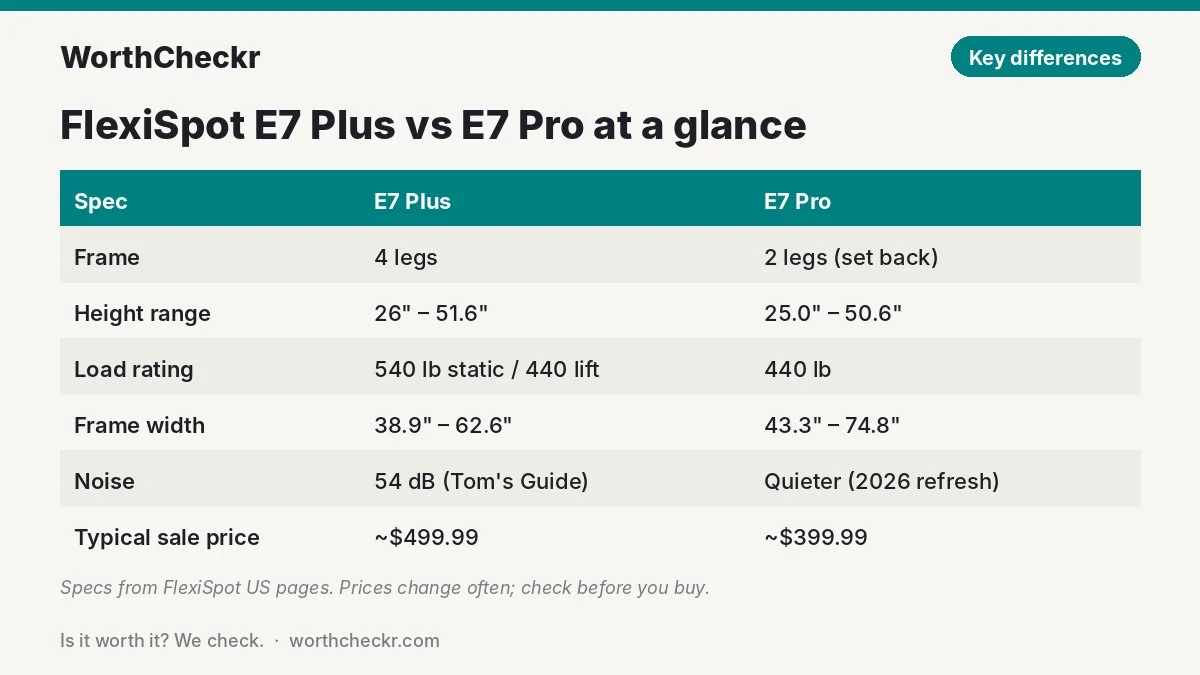
One wrinkle: TechRadar’s buying guide lists slightly different E7 Plus numbers (25.2″–50.8″ and a 10-year warranty), which look like UK/EU figures. We’ve used FlexiSpot’s US page above. Tom’s Guide also notes a shorter E7 Plus frame option (24″–45.7″) for smaller users.
Reviewer scorecard: who wins each round
| Category | Winner | What reviewers said |
|---|---|---|
| Stability | E7 Plus | Tom’s Guide called it the most solid electric desk it had tested; GameRevolution still saw slight wobble on the E7 Pro at max height. |
| Load capacity | E7 Plus | 540 lb static vs 440 lb; both lift 440 lb. |
| Height range | Split | E7 Plus goes 1″ higher; E7 Pro goes 1″ lower. |
| Legroom and footprint | E7 Pro | TechRadar flags the E7 Plus for taking up more room than two-leg desks. |
| Noise | E7 Pro | Tom’s Guide found the four-leg design louder; GameRevolution says the 2026 E7 Pro runs quieter than before. |
| Assembly | E7 Pro (narrowly) | Tom’s Guide needed a drill and extra planning for the E7 Plus; E7 Pro reviewers still call it a two-person job. |
| Price and value | E7 Pro | Usually about $100 cheaper for the same lifting rating and warranty. |
| Buyer sentiment | E7 Pro | RedditRecs: 93% positive for the E7 Pro vs 89% for the E7 Plus. |
| Overall | E7 Pro | Better value and space for most home offices; E7 Plus for stability-first buyers. |
Where reviewers agree
- Both are well built. iMore’s John-Anthony Disotto says he could lean his full weight on the E7 Pro without creaks, and TechRadar’s Collin Probst gave both desks Editor’s Choice awards.
- The motors are smooth. GamesRadar+ editor Tabitha Baker praised the E7 Pro’s judder-free movement, and TechRadar describes E7 Plus adjustments as smooth, quiet and quick.
- Assembly needs two people. Both desks ship in heavy boxes. GamesRadar+ took about an hour with a helper; TechRadar built the E7 Plus frame in roughly 33 minutes but spent hours on cable management.
- Pre-drilled holes can miss. Reviewers of both models (GamesRadar+ for the E7 Pro, The Gadgeteer and Tom’s Guide for the E7 Plus) hit misaligned or missing holes, so keep a drill handy.
- The keypads are good, the USB port is basic. Reviewers like the four presets but wish the charging port were USB-C (iMore) or higher power (GamingTrend).
2 leg vs 4 leg standing desk: stability at full height
This is the main reason to buy the E7 Plus. With a leg at each corner, the frame resists the side-to-side sway that two-leg desks show when raised high and pushed (by typing, a monitor arm or leaning on the edge).
The reviews back that up. Tom’s Guide’s Anthony Spadafora shook the E7 Plus at full height and it “didn’t budge a smidge.” The Gadgeteer’s Bill Henderson called it more stable than any two-leg desk he’d tried. GamingTrend’s Ron Burke ran a 3D printer on his and reported zero failed prints, which is a tough test because small vibrations ruin prints.
The E7 Pro is stable by two-leg standards, and the 2026 refresh improved it. GameRevolution’s Mack Ashworth found the new version wobbles less at maximum height but still not zero, and he suggests a four-leg desk for anyone who needs maximum stability. TechRadar’s Probst, who is 6’1″, had no complaints standing at his normal height.
What that means for you: if you’re under about 6 feet and run one or two monitors, you’re unlikely to notice a difference day to day. If you stand near the desk’s top height, type hard, or have a camera or microphone on the desk for calls, the four-leg frame is the safer bet. For the motor side of stability, see our explainer on single vs dual motor standing desks.
Where they differ: legroom, footprint and desk sizes
In the FlexiSpot E7 Plus vs E7 Pro legroom contest, the E7 Pro wins clearly: its legs are mounted near the rear edge, so the space under the front of the desk is wide open. That’s good news if you use a chair with armrests, roll a drawer unit under the desk, or want to put a walking pad underneath.
The E7 Plus puts a leg at each corner, with connecting rods underneath. That’s what makes it so steady, but it also boxes in the space. TechRadar notes it takes up more room than two-leg desks, and the frame tops out at 62.6 inches wide versus 74.8 inches for the E7 Pro. Both accept desktops up to about 80 inches wide.
The E7 Plus does have one tidy trick: FlexiSpot says the frame accepts clamp-on monitor mounts without extra wooden blocks and leaves room for a keyboard tray or under-desk drawer.
Where they differ: noise and assembly
Noise. Tom’s Guide measured the E7 Plus at 54 dB while moving, louder than two-leg dual-motor desks it had tried, which it blames on the rods under the frame. FlexiSpot doesn’t publish a dB rating for the E7 Pro, but GameRevolution found the 2026 version quieter and smoother than before. If you adjust height during calls, the E7 Pro is the more polite choice.
Assembly. Opinions on the E7 Plus split. GamingTrend found it simple, with clearly labelled, pre-assembled parts, while Tom’s Guide called it more complex than typical two-leg desks and The Gadgeteer found the support-beam step tricky. Its frame is also heavy (Tom’s Guide lists 130–140 lb). The E7 Pro is simpler, though GamesRadar+ notes the keypad holes have no drilling guide.
Where they differ: price and value
FlexiSpot prices move a lot, so treat these as typical rather than fixed. In TechRadar’s October 2026 guide, the E7 Pro is listed at $499.99 and on sale for $399.99, while the E7 Plus is listed at $599.99 and on sale for $499.99. RedditRecs has also tracked the E7 Pro as low as $299 on FlexiSpot’s site.
For that roughly $100 gap you get the same lifting rating (440 lb), the same 15-year frame warranty, the same keypad and the same motor count. In FlexiSpot E7 Plus vs E7 Pro terms, the extra money buys stability and a higher static rating, not more features. That’s why the E7 Pro wins on value for most buyers. If you’re shopping on a budget, our guide to the best standing desk under $500 compares both FlexiSpots with cheaper and compact options.
What buyers and owners are saying
Both desks have big, mostly happy owner bases, so owner feedback on the FlexiSpot E7 Plus vs E7 Pro question is richer than for most new desks.
- E7 Pro: RedditRecs ranks it the #1 standing desk across Reddit discussions, with 93% positive sentiment from 96 users. Its one-line summary: affordable and stable, but assembly can be confusing. On GummySearch’s Reddit roundup, one owner calls it the best you can get at this budget.
- E7 Plus: RedditRecs shows 89% positive across 152 reviews and ranks it #7. Owners praise the lack of wobble under heavy loads, and a 6’1″–6’2″ user reported minimal sway at full height.
- Common complaints: E7 Plus owners most often mention assembly (heavy parts, holes in the wrong place), basic built-in cable management and a rubberwood top that shows scratches and fingerprints. E7 Pro complaints centre on confusing instructions.
The 2026 E7 Pro refresh is newer, so long-term feedback on that specific version is still thin.
Our take: why the E7 Pro gets the edge
- Same lifting power for less. Both lift 440 lb, and the E7 Pro usually costs about $100 less.
- Owners like it more. It edges the E7 Plus on Reddit sentiment and ranks first overall on RedditRecs.
- Better for real home offices. Open legroom works with chair arms, drawers, PC towers and walking pads.
- The 2026 refresh closed the gap. GameRevolution found it steadier and quieter than the previous version.
- Stability is good enough for most. Unless you’re tall or run sensitive gear, the E7 Plus’s main advantage is one you may never feel.
Which FlexiSpot desk should you buy for working from home?
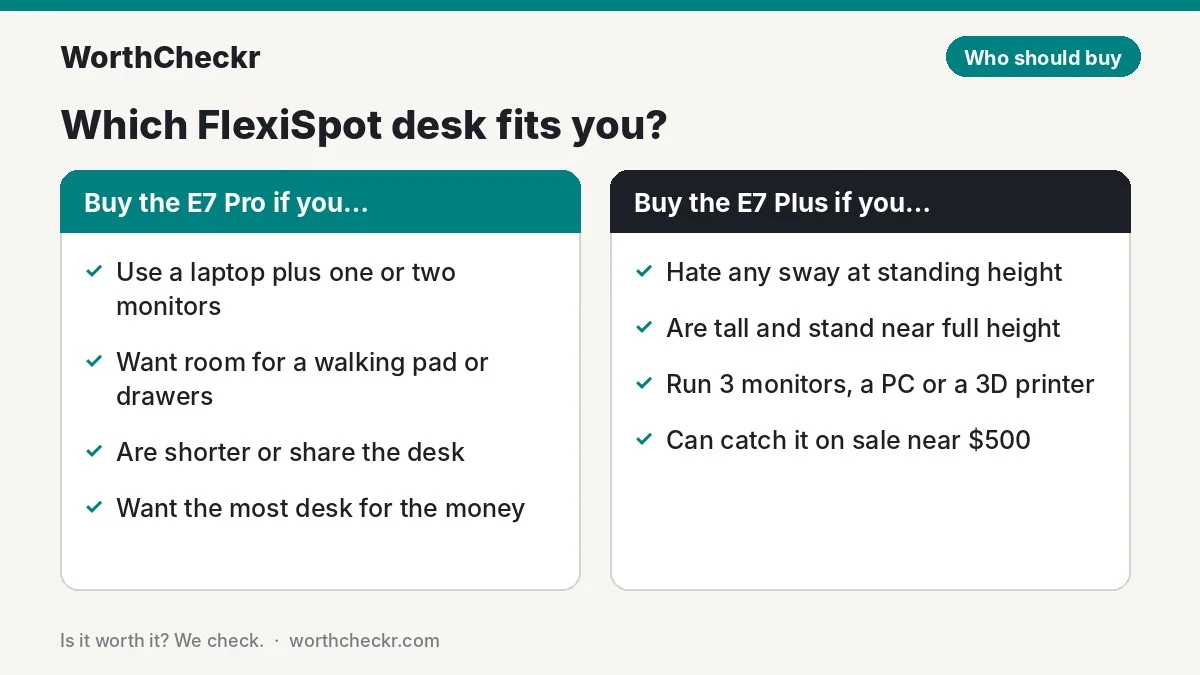
Use this table to settle FlexiSpot E7 Plus vs E7 Pro for your own setup.
| If you… | Buy |
|---|---|
| Work on a laptop plus one or two monitors | E7 Pro |
| Run three monitors on arms or a heavy desktop PC on top | E7 Plus |
| Are over about 6’1″ and stand at near-full height | E7 Plus |
| Are shorter or share the desk with someone who is | E7 Pro |
| Want a walking pad, drawer unit or PC tower under the desk | E7 Pro |
| Take video calls or record audio and hate any desk sway | E7 Plus |
| Want a desktop wider than 72 inches | E7 Pro (wider frame range) |
| Want the most desk for the money | E7 Pro |
Check FlexiSpot E7 Pro price → Check FlexiSpot E7 Plus price →
Still weighing other brands? Our Uplift V3 vs FlexiSpot E7 Pro comparison covers the E7 Pro’s biggest rival.
Accessories for your FlexiSpot desk
- Monitor arm: lifts screens to eye level and frees desk space. If you need a screen, see our best 27-inch 4K USB-C monitors for working from home.
- Cable tray or spine: owners of both desks say built-in cable management is basic, so add a tray and a cable spine that moves with the desk.
- Anti-fatigue mat: makes standing for more than a few minutes far more comfortable.
- A good chair: you’ll still sit most of the day. Our guide to the best office chairs under $500 has picks that pair well with either desk.
Check monitor arm prices → Check anti-fatigue mat prices →
FlexiSpot E7 Plus vs E7 Pro FAQ
What is the difference between the FlexiSpot E7 Plus and E7 Pro?
The E7 Plus has four legs and a 540 lb static rating; the E7 Pro has two rear-set legs and a 440 lb rating. Both use dual motors, four presets and a 15-year frame warranty. The E7 Plus is steadier at height; the E7 Pro is cheaper with more legroom.
Is a 4 leg standing desk more stable than a 2 leg desk?
Generally, yes. Reviewers including Tom’s Guide and The Gadgeteer found the four-leg E7 Plus noticeably steadier than two-leg desks at full height. The gap matters most for tall users and vibration-sensitive gear.
Is the FlexiSpot E7 Plus worth the extra money?
Only if stability is your top priority or you’re tall. For a typical laptop-plus-monitor home office, the E7 Pro does the same job for about $100 less.
Does the FlexiSpot E7 Pro wobble?
A little at maximum height. GameRevolution found the 2026 version steadier than the old one, but still not wobble-free when fully raised. At normal standing heights most owners don’t notice it.
Can the FlexiSpot E7 Pro hold three monitors?
Weight isn’t the issue: it lifts up to 440 lb. For three monitors on arms, though, the four-leg E7 Plus will feel steadier when you type at standing height.
Which FlexiSpot desk is best for tall people?
The E7 Plus reaches 51.6 inches versus 50.6 for the E7 Pro, and it’s steadier near the top. TechRadar’s 6’1″ reviewer was still comfortable on the E7 Pro.
Verdict
Winner: FlexiSpot E7 Pro. In the FlexiSpot E7 Plus vs E7 Pro matchup, the E7 Pro gives most remote workers the same 440 lb lifting power, warranty and keypad for about $100 less, with more room for your legs and gear, and owners rate it slightly higher. The E7 Plus is the steadier desk and the right buy for tall users, heavy multi-monitor rigs and anyone who can’t stand a hint of sway.
We’ll update this comparison as more long-term owner feedback on the 2026 E7 Pro comes in.
Check FlexiSpot E7 Pro price → Check FlexiSpot E7 Plus price →
More from WorthCheckr: browse all standing desk coverage and our head-to-head comparisons.
Sources: FlexiSpot (E7 Plus) · FlexiSpot (E7 Pro) · FlexiSpot blog · TechRadar (best standing desks) · TechRadar (E7 Plus) · Tom’s Guide · The Gadgeteer · GamingTrend · GameRevolution · GamesRadar+ · iMore · RedditRecs · GummySearch