Autonomous Desk Core vs Pro — WorthCheckr pick: Autonomous Desk Pro
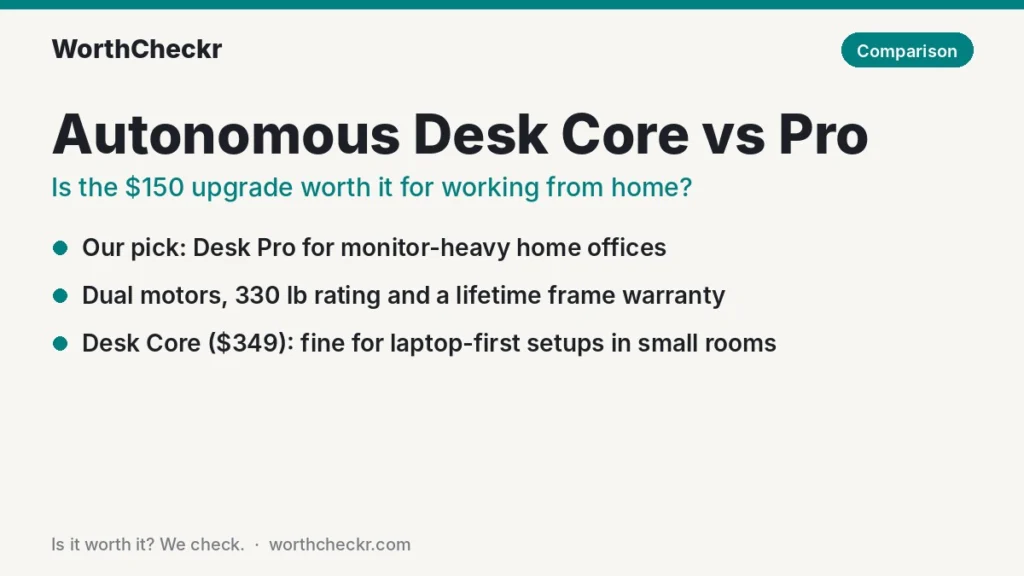
✓ Worth it for anyone running one or two monitors, a monitor arm or a desktop PC on their desk every workday.
- Dual motors and a 330 lb lifting rating, against one motor and 176 lb on today’s Core.
- A thicker 1.2″ HDF desktop at 53″ x 29″, versus a 0.7″ MDF/particleboard top at 48″ x 24″.
- A lifetime frame warranty instead of two years, plus anti-collision and a quieter motor rating.
- Better value per pound of lifting capacity: about $1.51 vs $1.98 at list price ($499 vs $349).
Pick the Desk Core instead if you work on a laptop or one light monitor, need a desk that fits a small room, and want to keep the total under $350.
Last updated November 12, 2026 · Research-based analysis by Abid Shehzad, WorthCheckr
Autonomous sells two everyday standing desks that sit $150 apart, and the names make them sound closer than they are. The Autonomous Desk Core vs Pro choice in 2026 is really a choice between a single-motor starter desk and a dual-motor workstation with nearly twice the lifting rating. If you work from home with a monitor or two, that gap matters more than the price tag suggests.
WorthCheckr hasn’t tested either desk in person. This comparison is based on Autonomous’s own spec pages, named reviewers at PCWorld, TechRadar, How-To Geek, GamesRadar+, BTOD and Work While Walking, and owner reports from Trustpilot, retailer-style review aggregators and user forums. One warning up front: most published reviews cover earlier versions of these desks, and the current Core is a different machine from the one reviewers praised in 2023. We flag that wherever it matters. For the basics on motors, sizes and stability, see our standing desk buying guide.
In this comparison
- Autonomous Desk Core vs Pro: the quick answer
- Autonomous Desk Core vs Pro specs side by side
- Heads-up: the Core reviewers tested isn’t the Core sold today
- Reviewer scorecard: SmartDesk Core vs SmartDesk Pro
- Single vs dual motor: stability, speed and noise
- Pre-buy check: will your setup fit the Core’s 176 lb limit?
- Price-per-feature math: what the extra $150 buys
- Common Autonomous desk problems owners report (and fixes)
- Our take: why the Desk Pro earns the edge
- Desk Core or Desk Pro: which should you buy?
- Autonomous Desk Core vs Pro FAQ
- Final verdict
Autonomous Desk Core vs Pro: the quick answer
The Desk Pro is the better buy for most home offices. The Core is a fair deal only for light, laptop-first setups. The single biggest thing to know: today’s Core uses one motor and is rated for 176 lb, so it isn’t the dual-motor Core that older reviews describe.
Choose the Autonomous Desk Core if…
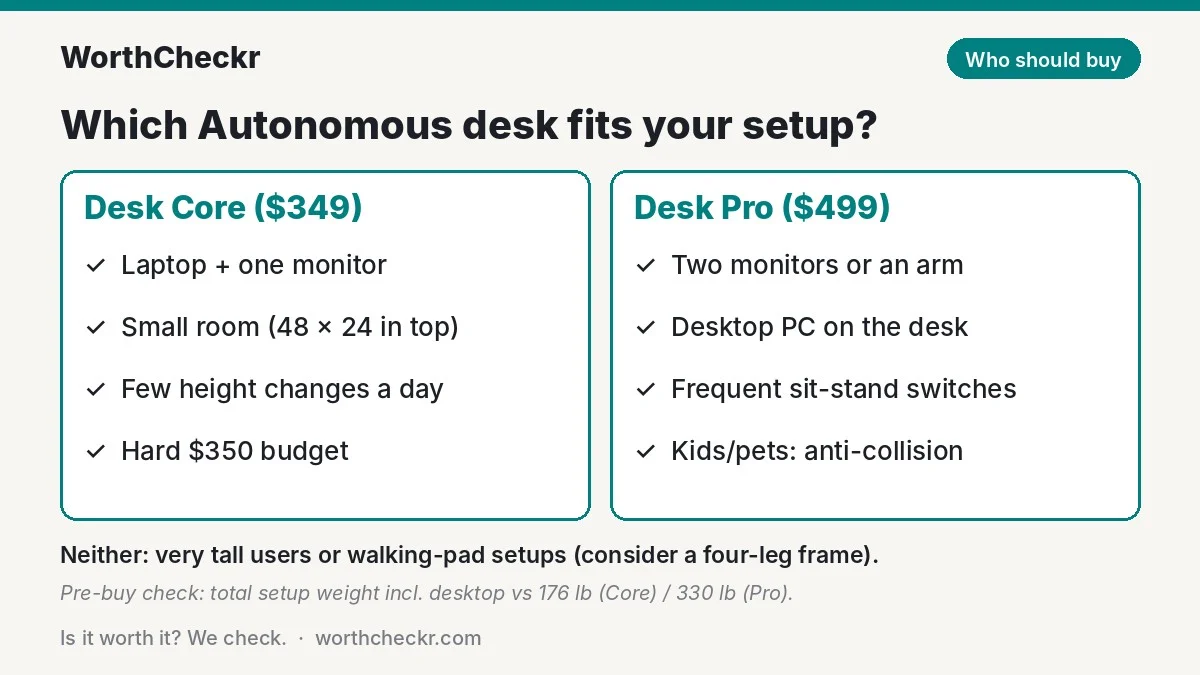
- You work mostly on a laptop, or with one monitor on its stand.
- Your room is tight and a 48″ x 24″ top is all you have space for.
- You change height a couple of times a day, not every hour.
- $349 is a firm ceiling.
Skip the Desk Core if… you plan to add a monitor arm, a second screen or a desktop PC later, you’re tall and will stand at full height, or a two-year frame warranty feels too short for a desk you want to keep for years.
Choose the Autonomous Desk Pro if…
- You run two monitors, arms, a dock or a tower on the desk.
- You want a deeper 29″ top so screens sit at a comfortable distance.
- You switch between sitting and standing many times a day.
- You want a lifetime frame warranty and anti-collision.
Skip the Desk Pro if… stability at full standing height is your top priority. BTOD’s 2026 WobbleMeter test rated the SmartDesk Pro frame among the least stable it has measured at 46″, so very tall users or treadmill-desk users may be happier with a four-leg frame (see our FlexiSpot E7 Plus vs E7 Pro comparison).
Check Autonomous Desk Pro price → Check Autonomous Desk Core price →
Autonomous Desk Core vs Pro specs side by side
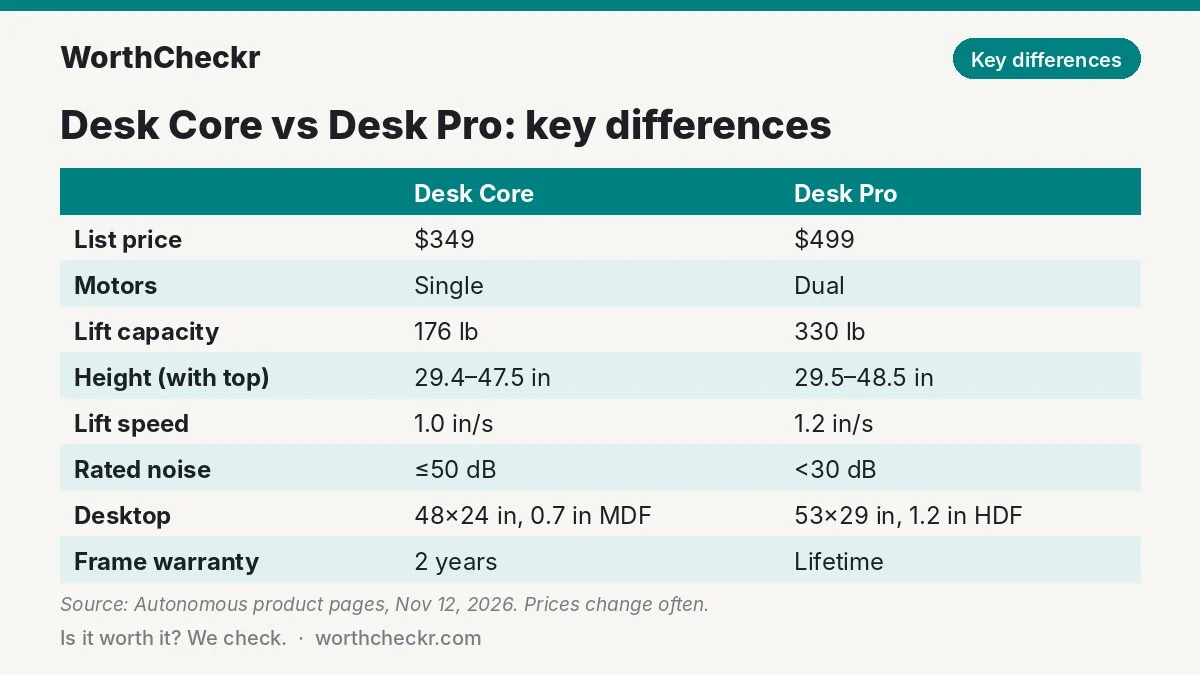
These figures come from Autonomous’s current product pages and its June 2026 Core-vs-Pro article, checked on November 12, 2026. Autonomous runs frequent sales, so treat the prices as list prices.
| Spec | Autonomous Desk Core | Autonomous Desk Pro |
|---|---|---|
| List price | $349 (48″ x 24″ top) | $499 (53″ x 29″ top) |
| Motors | Single | Dual |
| Lifting capacity | 176 lb | 330 lb |
| Height range (with top) | 29.4″–47.5″ | 29.5″–48.5″ |
| Lift speed | 1.0″ per second | 1.2″ per second |
| Rated noise | 50 dB or less | Under 30 dB |
| Leg design | 2-stage, C-frame | 2-stage, C-frame |
| Desktop | 0.7″ MDF/particleboard, 48″ x 24″ only | 1.2″ HDF, 53″ x 29″ (70.5″ x 29″ option) |
| Keypad | External, under the front edge | Embedded in the desktop edge |
| Anti-collision | No | Yes |
| Cable management | One cable tray included | Integrated cable management |
| Frame / top warranty | 2 years / 1 year | Lifetime / 2 years |
| Returns | Free 30-day returns (flash-sale deals excluded) | Free 30-day returns |
| Certifications listed | ANSI/BIFMA, UL, Green Standard | ANSI/BIFMA, Green; TÜV Rheinland stability report |
Two small conflicts to know about: Autonomous’s Pro page lists the bigger top both as “70.5″ x 29″” and as a separate “Expanse” option, and only the Core page lists UL certification. If either matters to you, confirm it with Autonomous chat before ordering. There’s also a Desk Pro AI variant with sensors, a wider 24.25″–53.5″ range and a 450 lb rating; Autonomous didn’t show a separate price for it when we checked, so this comparison sticks to the standard Pro.
Heads-up: the Core reviewers tested isn’t the Core sold today
This is the part most comparison pages miss. When How-To Geek’s Mark LoProto reviewed the SmartDesk Core in September 2023, it was a dual-motor desk rated for 265 lb with a claimed 2.3″ per second lift, priced around $399. Work While Walking’s February 2023 review also covered that dual-motor version.
The Autonomous Desk Core on sale now is cheaper ($349) but steps down to a single motor, a 176 lb rating and a 1.0″ per second lift. That makes it a lighter-duty desk, so the older praise for its “quiet and efficient” dual motors doesn’t carry over. The Pro changed too: 2023 reviews from PCWorld, TechRadar and GamesRadar+ list a range of roughly 26″–52″ and a 310 lb rating, while the current Pro page lists 29.5″–48.5″ and 330 lb.
What that means for you: use the older reviews for build, desktop and assembly impressions, but trust the current spec sheet for motors, capacity and height range. If you find a “SmartDesk Core” listing at a reseller, check whether it’s the old dual-motor stock or the new single-motor model before you compare prices.
Reviewer scorecard: SmartDesk Core vs SmartDesk Pro
We pulled findings from six named reviews. Dates matter here, so each row notes which version was tested.
| Category | Winner | What reviewers said |
|---|---|---|
| Build and desktop | Pro | PCWorld’s Dominic Preston (2023, Pro) called the desk solid and attractive; TechRadar’s Bryce Hyland said its parts feel made to last. Mark LoProto at How-To Geek (2023, Core) felt the Core’s top was a little cheap. |
| Stability | Tie (mixed) | LoProto felt no wiggle on the older Core, even on carpet. Work While Walking found both desks unsteady near full height. GamesRadar+’s Alex Berry saw no major wobble on the Pro with a dual monitor arm; BTOD’s June 2026 WobbleMeter rated it fair to very bad at 46″. |
| Noise | Pro | Berry measured about 40 dB on the Pro and TechRadar under 48 dB; BTOD lists 59 dB in motion. Autonomous rates the Pro under 30 dB and the Core at 50 dB or less. |
| Assembly | Tie | TechRadar built the Pro in 45 minutes; Preston said it took more time and tools than he wanted. LoProto says the Core needs two people because nothing comes pre-assembled. |
| Features | Pro | Reviewers knocked the 2023 Pro and Core for no collision detection and weak cable management. The current Pro adds anti-collision and built-in cable routing; the Core still has neither. |
| Value | Core for light use | How-To Geek gave the 2023 Core a 7/10 as an affordable option; today’s Core is $50 cheaper but has a smaller motor. |
| Buyer sentiment | Pro (thin data) | Autonomous holds about 4.5 stars from roughly 2,900 Trustpilot reviews; complaints focus on shipping and damage, not the frames. Model-specific owner feedback is thin for both. |
| Overall | Desk Pro | Stronger motor system, higher capacity, better warranty and a better desktop, with the same open C-frame weakness at full height. |
Single vs dual motor: stability, speed and noise
The motor count is the real dividing line. A single-motor desk drives both legs from one motor through a shared rod, so it’s usually slower and less suited to heavy loads. A dual-motor desk puts a motor in each leg, which spreads the work and keeps lifting smooth when the desk is loaded. Our explainer on single vs dual motor standing desks goes deeper, but here’s how it plays out on these two.
Speed
The Core lifts at 1.0″ per second and the Pro at 1.2″ per second. Going from 29.5″ to about 44″ (a typical standing height for someone around 5′9″) takes roughly 14–15 seconds on the Core and about 12 seconds on the Pro. That’s a small daily difference, but it adds up if you switch positions every hour.
Stability at standing height
Both desks use the same open C-frame with no front crossbar, which is good for knee room but tends to sway more at full height. Autonomous’s own TÜV Rheinland report for the Pro lists a worst-case deflection of 0.2344″ at 46″. BTOD’s independent test of the SmartDesk Pro frame was harsher. Neither the old nor the new Core has a published lab stability test, and the Core’s lower 176 lb rating suggests you shouldn’t load it up and expect it to stay rock-steady. If a desk you already own sways, our standing desk wobble fixes start with free adjustments.
Noise
The Pro’s motor rating (under 30 dB) is far quieter than the Core’s (50 dB or less) on paper. Reviewer measurements of the Pro ranged from about 40 dB to 59 dB depending on distance and method, so expect “quiet office hum” rather than silence. That’s still the better pick for early-morning calls or a shared bedroom office.
Pre-buy check: will your setup fit the Core’s 176 lb limit?
This is the check that decides the Core vs Pro question for most remote workers. Add up everything that will sit on the desk, including the desktop itself. Use your own product spec sheets where you can; the figures below are typical estimates.
| Item | Typical weight (estimate) |
|---|---|
| Desktop (the Core’s 48″ x 24″ top) | About 25–35 lb, check the spec sheet |
| 27-inch monitor on its stand | About 10–15 lb each |
| 32-inch or ultrawide monitor | About 15–25 lb each |
| Dual monitor arm | About 8–15 lb |
| Desktop PC tower | About 15–35 lb |
| Laptop, dock, speakers, lamp | About 5–15 lb combined |
| Leaning on the desk while typing | Leave 20–30% headroom |
A laptop plus one 27-inch screen totals roughly 50–65 lb with the top, well inside the Core’s 176 lb. Two ultrawides on an arm with a tower on the desk can reach 100–120 lb. The Core can technically lift that, but you’d be using most of its rating on a single motor every day, which is exactly where the Pro’s 330 lb rating and dual motors earn their keep.
Height is the second pre-buy check. Both desks bottom out around 29.4″–29.5″, which is fine for many people but can be too tall for shorter users when seated. Work While Walking flagged this for both desks. Plug your height into our standing desk height calculator: if your ideal seated desk height is below about 29″, neither standard model fits well.
Price-per-feature math: what the extra 0 buys
At list price, the Pro costs 43% more. Here’s what that money buys, worked out from Autonomous’s published specs.
| Measure | Desk Core ($349) | Desk Pro ($499) |
|---|---|---|
| Desktop area | 1,152 sq in (8.0 sq ft) | 1,537 sq in (10.7 sq ft) |
| Price per sq ft of desktop | About $43.60 | About $46.80 |
| Price per lb of lifting capacity | About $1.98 | About $1.51 |
| Frame warranty | 2 years (about $175 per covered year) | Lifetime |
| Extras included | Cable tray | Anti-collision, integrated cable management, embedded keypad |
The Pro costs about 7% more per square foot of desktop, but it’s about 24% cheaper per pound of lifting capacity and adds a warranty that never runs out on the frame. Its top is also 5″ wider and 5″ deeper, which matters for viewing distance: a 29″-deep desk lets you push a 27-inch monitor back to a comfortable arm’s length, while 24″ can feel cramped. Our monitor size calculator shows the viewing distance your screen needs.
If you’d buy a cable tray and better grommets for the Core anyway, the real gap shrinks further. The only buyers for whom the $150 doesn’t pay back are those with genuinely light setups in small rooms.
Common Autonomous desk problems owners report (and fixes)
Model-specific owner feedback is thin for both desks, partly because the current versions are new and partly because many owners just say “my Autonomous desk.” We’ve labeled where a report comes from a reviewer, an earlier version (SmartDesk 2 or the 2023 models) or Autonomous in general. We couldn’t reach Reddit for this update, so forum coverage is limited to Blind, Slickdeals and review comments.
Autonomous Desk Core
- Wobble near the top of the range. Work While Walking called the 2023 Core unsteady near full height; How-To Geek felt none, and one August 2026 Trustpilot reviewer who named the Core said it stays stable at full height. How widespread: mixed, a few reports either way. Fix: tighten all frame bolts after a week of use and keep heavy items near the legs.
- Assembly holes that don’t line up. Work While Walking reported two pre-drilled holes not matching the rubber stoppers and confusing early steps, and says several viewers of Autonomous’s assembly video said the same. How widespread: a few reports. Workaround: leave the crossbeam loose until later in the build, then align it.
- Desktop scratches easily. Work While Walking, How-To Geek and one owner on Blind all mentioned it. How widespread: a few reports. Fix: a desk mat under the keyboard and mouse.
- Keypad gets bumped; no anti-collision. Mentioned by How-To Geek’s reviewer; the current Core still lacks anti-collision. How widespread: one review. Workaround: keep the keypad clear of drawers and chair arms.
Autonomous Desk Pro
- Sway at standing height. The most consistent theme. BTOD’s 2026 test and Work While Walking both found the SmartDesk Pro frame unsteady when raised high, and one Slickdeals owner of an older SmartDesk 2 XL on carpet said his monitors bounced while he typed (predecessor report). GamesRadar+ disagreed. How widespread: several sources. Fix: level the feet, put the desk on a hard floor or a firm mat, and use a wall-side setup.
- Scratches on the top. GamesRadar+ saw marks on the matte black top after a few months, and Looria’s summary of about 48 reviews lists scratch-prone tops. How widespread: a few reports. Fix: a desk mat; consider a lighter color, which hides marks better.
- Assembly quality control. Work While Walking found misaligned stopper holes, an off-center grommet hole and instructions that still said “SmartDesk 2.” How widespread: one detailed review. Fix: check parts before you start and contact support quickly if anything is off.
- One leg stops or the desk won’t move. Older SmartDesk 2 owners reported a stalled side in review comments (predecessor reports, a couple of cases). Autonomous’s fix: unplug for 20 seconds, reset, and swap the two leg cables on the control box if one side still won’t rise. For the Desk Pro, Autonomous says a reset is holding up and down together for about 3 seconds until it beeps.
Brand-wide issues (both desks)
- Shipping delays and damaged tops. About eight of 22 ComplaintsBoard posts (mostly 2020–21) were delivery delays, and recent 2026 Trustpilot reviews mention occasional scratched or damaged tops on arrival. Fix: inspect the box before signing and photograph damage right away.
- Error codes. Autonomous’s help center says E01 means overheating (unplug and wait 20 minutes), E03 means an obstacle and E04 points to a loose control box. “RST” is a normal reset prompt, not a fault.
Our take: why the Desk Pro earns the edge
- It’s the right desk for real work setups. Two monitors, an arm and a dock are normal for remote workers now. The Pro’s 330 lb rating handles that with room to spare; the Core’s 176 lb on one motor doesn’t leave much margin.
- The warranty gap is huge. Lifetime coverage on the frame versus two years is the clearest sign of how long each desk is built to last.
- Better value where it counts. It’s cheaper per pound of capacity and adds anti-collision, cable management and a thicker top that would cost extra to retrofit.
- The Core changed for the worse. Today’s Core is cheaper than the version reviewers liked, but it gave up the dual motors that made it a bargain.
- The shared weakness is the same. Both use an open C-frame, so neither is the steadiest at full height. If that’s your priority, look at a four-leg frame instead of paying for either.
Desk Core or Desk Pro: which should you buy?
| If you… | Buy |
|---|---|
| Work on a laptop with one monitor | Desk Core |
| Have a small room or a narrow alcove | Desk Core |
| Run two monitors or a monitor arm | Desk Pro |
| Keep a desktop PC on the desk | Desk Pro |
| Take calls early or share the room | Desk Pro (quieter rating) |
| Have kids or pets near the desk | Desk Pro (anti-collision) |
| Want the desk to last 10+ years | Desk Pro (lifetime frame warranty) |
| Are very tall or use a walking pad | Neither: consider a four-leg frame |
| Need a seated height below about 29″ | Neither standard model; check the Pro AI’s range |
Still comparing brands? Our standing desk comparison chart filters 10 desks by your height, budget and setup weight, and FlexiSpot E5 vs E7 covers a similar budget-vs-step-up choice from another brand.
Check Autonomous Desk Pro price → Check Autonomous Desk Core price →
Autonomous Desk Core vs Pro FAQ
Is the Autonomous Desk Pro worth the extra $150 over the Core?
For most home offices, yes. The extra $150 buys dual motors, nearly double the lifting capacity (330 lb vs 176 lb), a bigger and thicker desktop, anti-collision and a lifetime frame warranty. If you only use a laptop and one monitor in a small room, the Core is enough.
Is the Autonomous Desk Core single or dual motor?
The current Autonomous Desk Core is single motor, according to Autonomous’s 2026 product page and Core-vs-Pro article. Older SmartDesk Core reviews from 2023 describe a dual-motor version, so check which one a reseller is selling.
What’s the difference between the SmartDesk Core and SmartDesk Pro?
The main differences are motors (one vs two), capacity (176 lb vs 330 lb), speed (1.0″ vs 1.2″ per second), desktop (0.7″ MDF at 48″ x 24″ vs 1.2″ HDF at 53″ x 29″) and warranty (2 years vs lifetime on the frame). Both use a 2-stage C-frame with a similar height range.
Does the Autonomous Desk Pro wobble?
Reviewers disagree. GamesRadar+ found no major wobble with a dual monitor arm, but BTOD’s 2026 WobbleMeter rated the SmartDesk Pro frame fair to very bad at 46″. Expect some sway at full standing height, as with most open C-frame desks.
How much weight can the Autonomous Desk Core hold?
Autonomous rates the current Desk Core at 176 lb, including the desktop. That’s plenty for a laptop and one or two light monitors, but tight for ultrawides, arms and a PC tower.
How do I reset an Autonomous standing desk?
For the Desk Pro, Autonomous says to hold the up and down buttons together for about 3 seconds until the desk beeps. Other models use a different sequence, so check the part number on your control box label against Autonomous’s reset help page.
Final verdict
Winner: Autonomous Desk Pro. In the Autonomous Desk Core vs Pro matchup, the Pro is the desk we’d point most remote workers to. Its dual motors, 330 lb rating, larger 1.2″ top, anti-collision and lifetime frame warranty justify the $150 premium for anyone with a monitor-heavy setup. The Core is fine for a laptop-first desk in a small room, but the 2026 version is a lighter, single-motor desk, not the dual-motor bargain older reviews describe.
Neither is the steadiest desk at full standing height, so very tall users should look at four-leg frames. We’ll update this comparison as more owner feedback on the current Core and Pro comes in.
Check Autonomous Desk Pro price → Check Autonomous Desk Core price →
Sources: Autonomous: Desk Core vs Pro · Autonomous Desk Core product page · Autonomous Desk Pro product page · PCWorld (Dominic Preston) · TechRadar (Bryce Hyland) · How-To Geek (Mark LoProto) · GamesRadar+ (Alex Berry) · BTOD WobbleMeter · Work While Walking · Autonomous error codes · Trustpilot