HP 732xk vs Dell U3225QE — WorthCheckr pick: Dell UltraSharp U3225QE
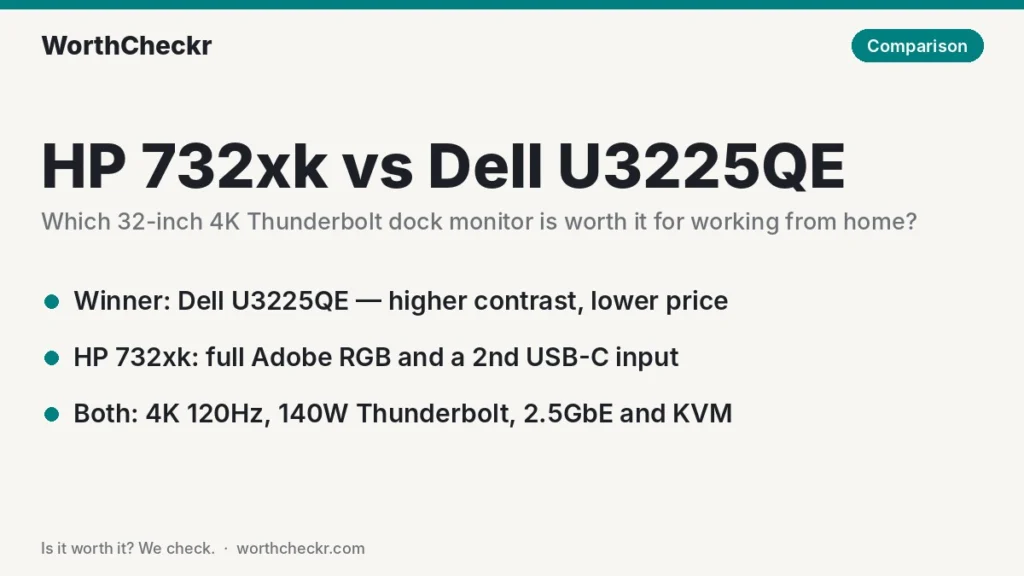
✓ Worth it for home office workers who need a large 4K screen and a one-cable laptop dock, and would rather not pay extra for color features they won’t use.
- It usually sells for $150 to $280 less than the HP 732xk at US retailers.
- It measured higher contrast and slightly higher brightness in PCWorld’s tests of both monitors.
- It adds a headphone/line-out jack and has a long, positive track record with owners.
- PCWorld names it the best home office monitor overall; the HP is listed only as a notable alternative.
Pick the HP 732xk instead if you do print or photo work that needs full Adobe RGB coverage, or you find it at the same price as the Dell.
Last updated October 30, 2026 · Research-based analysis by Abid Shehzad, WorthCheckr
HP’s newest Series 7 Pro, the 732xk, takes direct aim at the monitor most home office buyers already have on their shortlist. In the HP 732xk vs Dell U3225QE matchup, both are 32-inch 4K screens with IPS Black panels, 120Hz refresh, Thunderbolt 4 docking with up to 140W charging, 2.5Gb Ethernet and a built-in KVM switch. On paper they’re close to twins, so the right pick depends on the small differences and on price.
The HP 732xk was announced at CES in January 2026 and went on sale in March. Reviews from ITPro and PCWorld followed in the spring, and PCWorld’s Matthew S. Smith, who has reviewed both monitors, said the two are closely matched. The Dell U3225QE has been on sale since early 2025 and has hundreds of owner reviews behind it. WorthCheckr hasn’t tested either monitor; this is a research-based comparison of what named reviewers measured and what buyers report.
Still deciding what kind of monitor you need? Our guide to choosing a monitor for working from home walks through size, resolution, panel type and docking, and links every WorthCheckr monitor comparison.
In this comparison
- HP 732xk vs Dell U3225QE: the quick answer
- HP 732xk vs Dell U3225QE specs side by side
- Reviewer scorecard: who wins each round
- Where reviewers agree
- Where they differ: contrast, brightness and color
- Where they differ: ports, charging and the KVM switch
- Where they differ: price and value math
- Don’t mix up the HP 732xk and the older 732pk
- What buyers and owners are saying
- Our take: why the U3225QE gets the edge
- Which 32-inch Thunderbolt monitor should you buy?
- Accessories for a 32-inch dock monitor setup
- HP 732xk vs Dell U3225QE FAQ
- Verdict
HP 732xk vs Dell U3225QE: the quick answer
Choose the Dell UltraSharp U3225QE if…
- Your workday is documents, spreadsheets, email, code and video calls.
- You want the lower price; it’s commonly about $890 at Best Buy versus about $1,050 to $1,170 for the HP.
- You plug headphones or speakers into your monitor (the Dell has a line-out jack).
- You’d like a monitor with a long owner track record and a three-year Advanced Exchange warranty.
Choose the HP Series 7 Pro 732xk if…
- You edit photos for print or need wide Adobe RGB coverage; PCWorld and ITPro both measured 100%.
- You want very accurate color straight out of the box; PCWorld measured an average error of 0.61.
- You need two upstream USB-C connections for two laptops, plus picture-by-picture to see both at once.
- Your company buys HP hardware, or you find the 732xk on sale at the Dell’s price.
Both run a work laptop and a personal PC from one keyboard and mouse. If that’s the main reason you’re shopping, our best monitor with KVM switch guide covers cheaper options too.
Check Dell U3225QE price → Check HP 732xk price →
HP 732xk vs Dell U3225QE specs side by side
We pulled these numbers from HP and Dell launch specs, US retailer listings and lab results published by the reviewers named below. Lab figures say who measured them, and where two sources conflict, both are shown.
| Spec | HP Series 7 Pro 732xk | Dell UltraSharp U3225QE |
|---|---|---|
| Released | Announced January 2026; on sale from March 2026 | Early 2025 |
| US price | $1,049 MSRP per PCWorld; $1,167.71 at Staples when we checked | $949.99 launch MSRP; $889 at Best Buy when we checked ($1,029.99 Dell list) |
| Panel | 31.5″ IPS Black, matte | 31.5″ IPS Black, matte |
| Resolution and density | 3840 x 2160, about 140 PPI | 3840 x 2160, about 140 PPI |
| Refresh rate | 120Hz (reviewers disagree on adaptive sync support) | 120Hz with HDMI VRR |
| Contrast | Rated 2,000:1 to 2,700:1 depending on the listing; 2,390:1 measured by PCWorld | Rated 3,000:1; 2,900:1 measured by PCWorld |
| SDR brightness | 450 nits rated; 442 nits measured by PCWorld, about 400 by ITPro | 450 nits rated; 469 nits measured by PCWorld, 339 by Laptop Mag (Standard mode) |
| Color gamut (measured, PCWorld) | 100% sRGB, 99% DCI-P3, 100% Adobe RGB | 100% sRGB, 98% DCI-P3, 92% Adobe RGB |
| HDR | DisplayHDR 400 per PCWorld and ITPro (some launch coverage listed 600); 713 nits sustained measured by PCWorld | DisplayHDR 600 |
| Upstream connections | Thunderbolt 4 (40Gbps), USB-C (10Gbps, DisplayPort), USB-B | Thunderbolt 4 (40Gbps), plus a USB upstream for the KVM’s second computer |
| Laptop charging | Up to 140W, shared between Thunderbolt and USB-C inputs (ITPro lists 100W) | Up to 140W over Thunderbolt 4 |
| Video inputs and outputs | HDMI 2.1, DisplayPort 1.4 in; DisplayPort out and Thunderbolt 4 out for daisy-chaining | HDMI 2.1, DisplayPort 1.4 in and out; Thunderbolt 4 downstream (15W) |
| USB hub | 5x USB-A, 1x USB-C (15W), all 10Gbps | Several USB-A and USB-C ports (10Gbps), including a pop-out front panel |
| Ethernet and KVM | 2.5GbE, built-in KVM | 2.5GbE, built-in KVM |
| Audio | No speakers | No speakers; 3.5mm line-out |
| Extras | Ambient light sensor, picture-by-picture and picture-in-picture, hardware calibration support | Ambient light sensor, TÜV five-star eye comfort rating |
| Stand | 150mm height, tilt, ±45° swivel, 90° pivot; about 8.4kg (18.5lb) with stand | Height, tilt, swivel and pivot; about 20.6lb with stand |
| Warranty (US) | 3-year limited | 3 years, Advanced Exchange and Premium Panel Exchange |
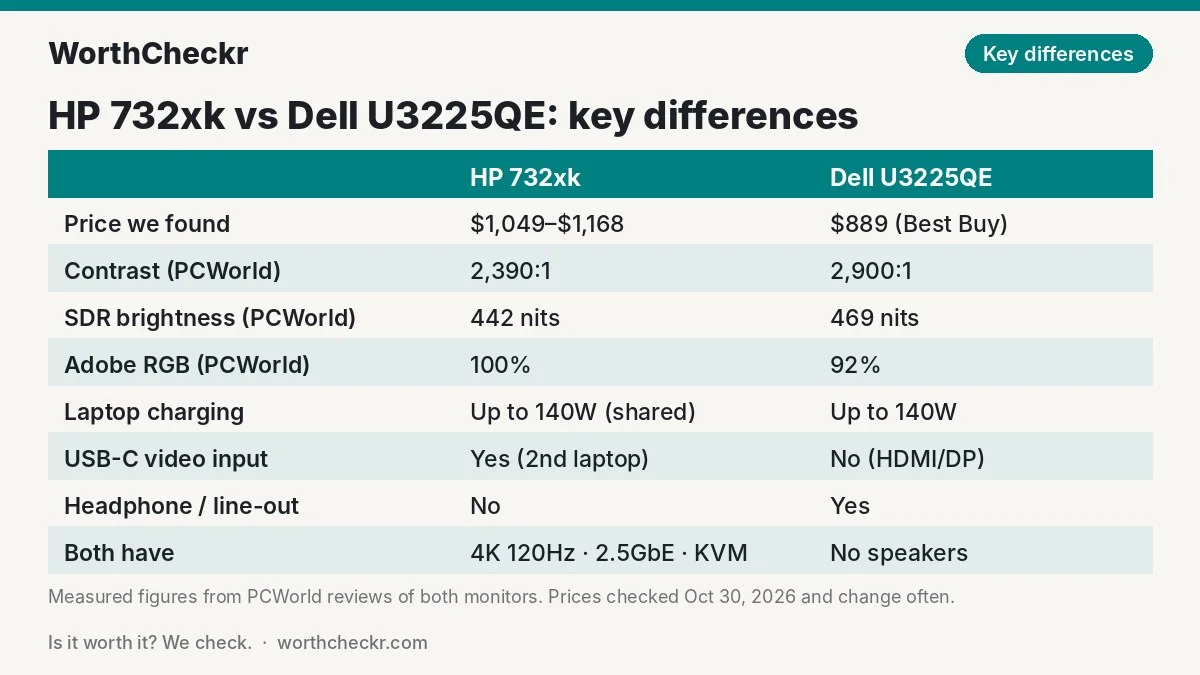
Reviewer scorecard: who wins each round
This scorecard combines five reviews: PCWorld (both monitors, both by Matthew S. Smith), ITPro (HP, Sasha Muller), TechRadar (Dell, Collin Probst) and Laptop Mag (Dell, Madeline Ricchiuto). Because one reviewer measured both screens with the same method, the head-to-head numbers below are a fairer comparison than mixing results from different labs.
| Category | Winner | What reviewers said |
|---|---|---|
| Contrast | Dell U3225QE | PCWorld measured 2,900:1 on the Dell and 2,390:1 on the HP. Both beat a normal IPS screen; neither comes close to OLED. |
| SDR brightness | Dell U3225QE (narrowly) | PCWorld measured 469 nits vs 442 nits. Either is plenty for a normal room; ITPro saw about 400 on the HP. |
| Color gamut and accuracy | HP 732xk | Both outlets measured 100% Adobe RGB on the HP; PCWorld found 92% on the Dell. PCWorld’s average color error on the HP was 0.61. |
| Color controls | Dell U3225QE | PCWorld criticized the HP’s missing gamma and color temperature controls and its cool 7100K default; the Dell ran slightly warm at 6300K. |
| Uniformity and motion | Too close to call | ITPro found the HP’s edges dimmed by up to 12% and motion looked smeary; neither matters much for office work. Laptop Mag noted the Dell shakes with small vibrations. |
| Ports and docking | HP 732xk (narrowly) | Same 140W Thunderbolt, Ethernet and KVM, but the HP adds a second USB-C upstream input. PCWorld called its port selection a standout. |
| Design and stand | Tie | ITPro liked the HP’s smooth one-handed stand; TechRadar gave the Dell’s design five out of five. |
| Price | Dell U3225QE | About $889 vs about $1,049 to $1,168 in the listings we checked. |
| Buyer sentiment | Dell U3225QE | 4.75 out of 5 from 103 Best Buy reviews; the HP has only a handful of retailer ratings so far. |
| Overall (for working from home) | Dell U3225QE | Nearly identical everyday experience, better contrast, more owner data and a lower price. |
Where reviewers agree
Read the five reviews together and a few points come up again and again:
- Both are true one-cable docks. Plug in a laptop over Thunderbolt and you get the picture, charging, wired Ethernet and every USB device on your desk. That can replace a separate $200 to $300 Thunderbolt dock.
- 4K at 32 inches is a sweet spot for work. At about 140 pixels per inch you get room for two full-size documents side by side, and text stays sharp at a normal sitting distance. If you’re torn on size, our 27 vs 32 inch monitor for work comparison explains when the bigger screen pays off.
- 120Hz is a nice extra, not a must. Scrolling feels smoother, but one U3225QE owner on the MacRumors forums said he noticed no real benefit over 60Hz for office tasks.
- HDR is a bonus at best. Both use edge-lit backlights, and PCWorld found HDR on both limited compared with mini-LED or OLED.
- Neither has speakers. Plan on headphones, a desk speaker or a soundbar for calls.
Where they differ: contrast, brightness and color
Both monitors use the same type of panel, so the picture differences are small and mostly come down to tuning.
Contrast favors Dell. In PCWorld’s back-to-back testing, the Dell’s 2,900:1 contrast was about 20% higher than the HP’s 2,390:1. In practice that means slightly deeper grays in dark-mode apps and a little more depth in photos and video. It’s visible side by side but small on its own.
Brightness is a wash. Both are rated at 450 nits, and PCWorld measured both within about 30 nits of each other. Either one is bright enough for a sunny home office. Laptop Mag’s lower Dell reading (339 nits in Standard mode) shows how much results depend on the picture preset, so turn brightness up before judging either screen.
Color favors HP, but only for some people. The 732xk covers the full Adobe RGB range, which matters if you prepare photos for print. ITPro’s Sasha Muller found average color errors of 1 or less in every factory-calibrated mode and said the HP majors on productivity-focused image quality. The Dell covers 92% of Adobe RGB, which is still excellent for web, office and video work.
The HP has a catch for color fussers. PCWorld found no gamma or color temperature controls in its menu, and its default white point ran cool. ITPro also couldn’t get HP’s recalibration software to work with an X-Rite i1Display colorimeter. If you plan to fine-tune by eye, the Dell is easier to live with.
Where they differ: ports, charging and the KVM switch
Both screens charge at up to 140W over Thunderbolt 4, which is enough for a 16-inch MacBook Pro or a large Windows work laptop. PCWorld notes the HP shares its 140W across its Thunderbolt and USB-C inputs, and ITPro’s spec table lists 100W, so if you’ll run two laptops at once, don’t expect both to charge at full speed.
The HP’s extra USB-C upstream port is its most useful edge for hybrid workers. You can keep a work laptop on Thunderbolt and a personal laptop on USB-C, both carrying video and data, then flip between them with the KVM switch or show both side by side with picture-by-picture. The Dell does the same job, but its second computer connects over HDMI or DisplayPort plus a separate USB cable for the KVM.
The Dell wins on small conveniences. It has a 3.5mm line-out for headphones or speakers, and a pop-out panel on the bottom edge with quick-access USB ports. TechRadar’s Collin Probst singled out the pop-out panel, and a MacRumors forum owner said it was handy for a keyboard and security key.
Setup tip for both: put your work laptop on the Thunderbolt port, since that’s the connection with full charging, and use the KVM’s USB upstream for your second computer. Then plug your keyboard, mouse and webcam into the monitor’s hub so they follow whichever computer is on screen.
Where they differ: price and value math
Since the everyday experience is so similar, price decides a lot. Here’s the math with the prices we found today.
| Scenario | HP 732xk | Dell U3225QE | Gap |
|---|---|---|---|
| Launch MSRP | $1,049 | $949.99 | About $100 |
| Prices we found (Oct 30, 2026) | $1,167.71 (Staples) | $889 (Best Buy) | About $279 |
| Best case for HP (if sold near MSRP) | $1,049 | $889 | About $160 |
So what does the extra $160 to $280 buy you with the HP? Mainly full Adobe RGB coverage, a second USB-C upstream input and picture-by-picture. You give up about 20% of measured contrast and the headphone jack. For a print photographer, that trade can make sense. For everyone else, the savings are worth more than the extras. That money covers a good monitor arm and a webcam, or most of a quality keyboard and mouse.
Prices on both monitors move often, especially around Black Friday. If the HP drops to within about $50 of the Dell, it becomes a much closer call.
Don’t mix up the HP 732xk and the older 732pk
This is the most common buying mistake we found while researching. HP still sells the older Series 7 Pro 732pk, and many listings show it next to the new 732xk with almost the same name: “HP Series 7 Pro 31.5 inch 4K Thunderbolt 4 Monitor.”
| Detail | HP 732pk (2024) | HP 732xk (2026) |
|---|---|---|
| Refresh rate | 60Hz | 120Hz |
| Thunderbolt charging | 100W | Up to 140W |
| Ethernet | Gigabit | 2.5 Gigabit |
| Rated contrast | 2,000:1 | 2,000:1 to 2,700:1 depending on the listing |
| US launch price | $879 (per Notebookcheck) | $1,049 MSRP (per PCWorld) |
| Part number to look for | 8Y2K9AA | B7JM6AA |
The 732pk isn’t a bad monitor, but against the Dell U3225QE it loses on refresh rate, charging and Ethernet speed. Check the model and part number on the listing before you buy.

What buyers and owners are saying
The Dell has far more owner feedback. Best Buy shows a 4.75 out of 5 average from 103 reviews. In a long MacRumors forum post, owner MikeDr206 described running it with an M3 MacBook Air at a scaled “looks like 2560 x 1440” setting with no slowdown. He liked the sturdy stand and the pop-down ports. His complaints were the lack of speakers and a slightly flatter look than his older Dell 6K screen, which he put down to the matte coating. He said he would buy it again.
Owner feedback on the HP 732xk is still thin. It’s newer and sells mostly through business channels. Staples showed a 4.86 out of 5 average from just seven ratings, with no written reviews to read. We couldn’t find detailed owner write-ups on Reddit or forums yet, so we’ll update this section as more buyers report back.
The most common complaints across sources, summarized:
- Dell U3225QE: no speakers; HDR is underwhelming; the screen can wobble on a desk that shakes (Laptop Mag); some wish it had Thunderbolt 5.
- HP 732xk: no speakers; limited color controls; some edge dimming (ITPro); HP’s calibration software didn’t work with ITPro’s colorimeter; confusing model naming.
If you use a standing desk, a wobbling 32-inch monitor is usually a desk problem rather than a monitor one. Our guide to fixing standing desk wobble covers the fixes, and a solid desk frame matters more at standing height.
Our take: why the U3225QE gets the edge
- Same everyday experience. Screen size, resolution, refresh rate, 140W Thunderbolt charging, 2.5GbE and the KVM switch all match. Those are the parts of a dock monitor a laptop user leans on daily.
- Better measured contrast. In one reviewer’s head-to-head testing, the Dell came out about 20% ahead.
- Lower price. It typically costs $160 to $280 less, money that’s better spent elsewhere on your desk.
- Owners like it. Over 100 Best Buy reviews average 4.75 out of 5, and PCWorld names it the best home office monitor overall.
- Fewer quirks. Normal color controls, a headphone jack and no risk of buying the wrong model.
The HP 732xk is a very good monitor, and ITPro’s reviewer called it one of the best-value monitors he’d seen in years in UK pricing. In the US it simply costs more than the Dell for features most remote workers won’t use.
Which 32-inch Thunderbolt monitor should you buy?
| If you… | Buy |
|---|---|
| Spend your day on documents, email, spreadsheets and calls | Dell U3225QE |
| Want the lowest price for a 32-inch 4K Thunderbolt dock monitor | Dell U3225QE |
| Edit photos for print or need full Adobe RGB coverage | HP 732xk |
| Connect two laptops over USB-C and want to see both at once | HP 732xk |
| Use wired headphones or speakers through the monitor | Dell U3225QE |
| Like to fine-tune white balance and gamma yourself | Dell U3225QE |
| Find the HP within about $50 of the Dell | HP 732xk |
| Work on a Mac and want the sharpest possible text | Consider a 5K screen; see our 4K vs 5K monitor for Mac guide |
Want true blacks instead? Our Dell U3226Q vs U3225QE comparison looks at Dell’s QD-OLED version, and for a smaller screen see our best 27-inch 4K USB-C monitors for working from home.
Check Dell U3225QE price → Check HP 732xk price →
Accessories for a 32-inch dock monitor setup
- A certified Thunderbolt 4 cable. Use the one in the box or a certified 40Gbps cable; a cheap charging-only USB-C cable won’t carry video or 140W.
- A monitor arm. Both monitors take a VESA mount. A gas-spring arm rated for at least 10kg (22lb) handles either and frees up desk space.
- A desk speaker or headset. Neither has speakers. The Dell’s line-out makes a wired speaker easy.
- A webcam. Neither has a built-in camera. Plug one into the monitor’s USB hub so it switches with the KVM.
- A desk that’s deep and stable enough. A 32-inch screen works best at arm’s length; see our best standing desks for dual monitors for frames that stay steady with a heavy screen.
HP 732xk vs Dell U3225QE FAQ
Is the HP 732xk better than the Dell U3225QE?
Not for most people. They’re very similar, but the Dell measured higher contrast in PCWorld’s testing and usually costs $160 to $280 less. The HP is better for full Adobe RGB color and connecting two laptops over USB-C.
What is the difference between the HP 732pk and 732xk?
The 732xk is the 2026 model with a 120Hz refresh rate, up to 140W charging and 2.5Gb Ethernet. The 2024 732pk runs at 60Hz with 100W charging and Gigabit Ethernet. Look for part number B7JM6AA for the 732xk.
Does the HP 732xk have a KVM switch and 140W charging?
Yes. It has a built-in KVM switch, and HP’s launch specs and PCWorld list up to 140W of laptop charging, shared between its Thunderbolt 4 and USB-C inputs. ITPro’s spec table lists 100W, so check your laptop’s needs if you plan to charge two machines at once.
Is the Dell U3225QE good for working from home?
Yes. PCWorld names it the best home office monitor overall. It combines a sharp 32-inch 4K screen with a Thunderbolt dock, 140W charging, Ethernet, a KVM switch and an ambient light sensor.
Do the HP 732xk and Dell U3225QE have speakers?
No. Neither has built-in speakers. The Dell has a 3.5mm line-out for headphones or speakers; for the HP, use your laptop’s audio, a USB headset or a USB speaker.
Can I use the HP 732xk or Dell U3225QE with a MacBook?
Yes. Both connect to a MacBook over a single Thunderbolt cable that carries video, data and up to 140W of charging. At 32 inches, 4K gives macOS fewer pixels per inch than Apple’s own 5K screens, so most Mac owners pick a scaled setting, and text is slightly softer than on a 5K panel.
Verdict
Winner: Dell UltraSharp U3225QE. In the HP 732xk vs Dell U3225QE matchup, the Dell is the better buy for most people working from home. Its 4K picture, 120Hz motion and single-cable Thunderbolt docking match the HP feature for feature, and it adds stronger measured contrast, an audio jack and a smaller price tag.
The HP 732xk is a strong alternative for photographers and designers who need full Adobe RGB coverage, or for anyone juggling two laptops over USB-C. If it drops close to the Dell’s price, it’s worth it. We’ll update this comparison as more 732xk owner feedback comes in.
Check Dell U3225QE price → Check HP 732xk price →
More monitor comparisons and guides: Monitors · Comparisons · How to choose a monitor for working from home
Sources: PCWorld (HP Series 7 Pro review) · PCWorld (Dell U3225QE review) · PCWorld (best home office monitors) · ITPro · TechRadar · Laptop Mag · Notebookcheck (732xk launch) · Notebookcheck (732pk) · Staples (HP 732xk listing) · Best Buy (Dell U3225QE listing) · MacRumors Forums owner review