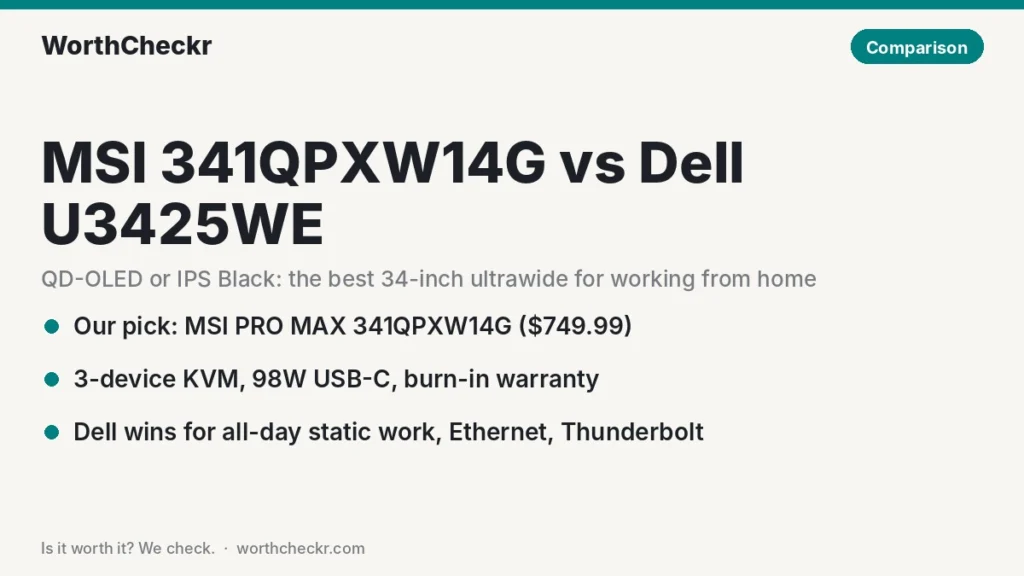
WorthCheckr pick: MSI PRO MAX 341QPXW14G
✓ Worth it for remote workers who want one 34-inch screen for work, Mac or Windows laptops, and evening films or games.
- It lists for $749.99, less than the Dell has sold for since launch.
- The QD-OLED panel gives far deeper contrast and wider color than IPS Black.
- Its KVM handles three devices to the Dell’s two.
- A 3-year warranty that covers burn-in takes most of the risk out of OLED.
Pick the Dell U3425WE instead if you keep the same spreadsheets, code or dashboards on screen 8+ hours a day, need wired Ethernet, or dock a Thunderbolt laptop.
Last updated November 3, 2026 · Research-based analysis by Abid Shehzad, WorthCheckr
In September 2026 MSI started selling the PRO MAX 341QPXW14G, a flat 34-inch QD-OLED ultrawide built for office work rather than gaming. It costs $749.99 and lands right on top of the monitor most home offices already shortlist: Dell’s UltraSharp U3425WE, a curved IPS Black Thunderbolt hub screen. So the 341QPXW14G vs U3425WE question is really OLED versus a proven office workhorse, at roughly the same money.
Below, we combine what reviewers at HotHardware, Windows Central, Techaeris, Notebookcheck, Club386 and KitGuru reported, plus MSI’s and Dell’s own spec sheets and early owner feedback. WorthCheckr hasn’t tested either monitor; this is a research-based comparison. If you’re still deciding on size or panel type, start with our complete guide to choosing a monitor for working from home.
In this comparison
- 341QPXW14G vs U3425WE: the quick answer
- 341QPXW14G vs U3425WE specs side by side
- Reviewer scorecard: who wins each round
- Where reviewers agree
- Where they differ: QD-OLED vs IPS Black picture
- Where they differ: burn-in and all-day static work
- Where they differ: KVM, Thunderbolt and Ethernet
- Where they differ: price and value
- What buyers and owners are saying
- Our take: why the MSI gets the edge
- 341QPXW14G vs U3425WE: which should you buy?
- Accessories for a 34-inch ultrawide home office
- 341QPXW14G vs U3425WE FAQ
- Verdict
341QPXW14G vs U3425WE: the quick answer
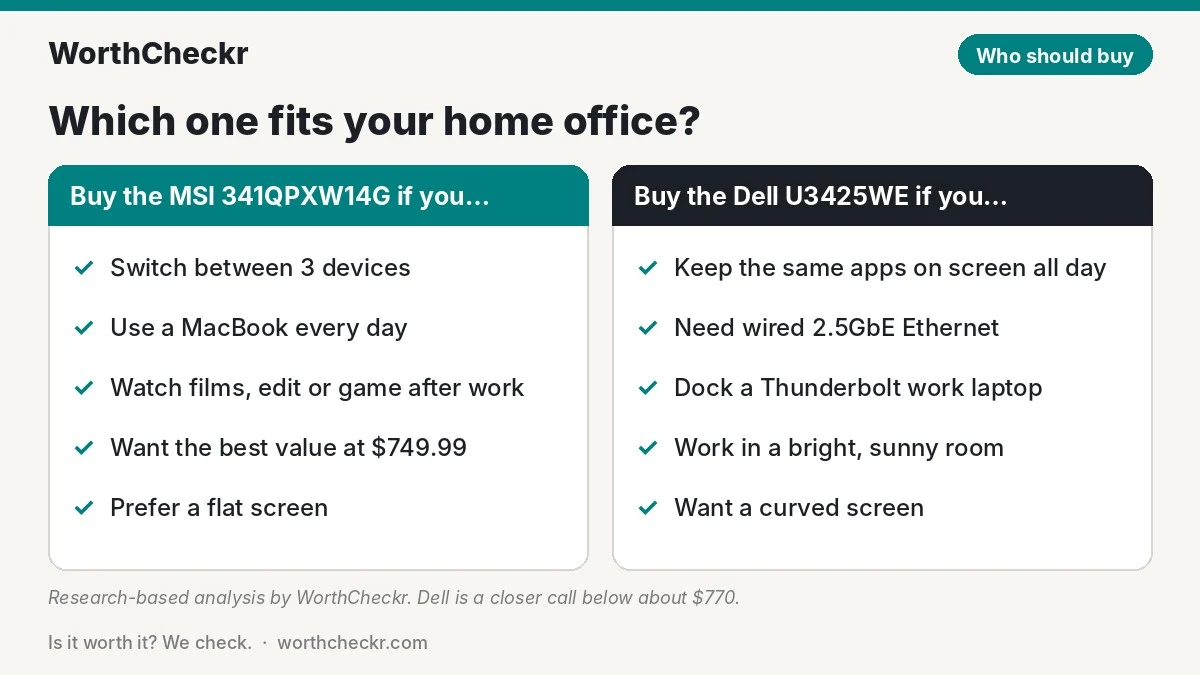
Choose the MSI PRO MAX 341QPXW14G if…
- You switch between a work laptop, a personal laptop and maybe a desktop (it handles three).
- You use a MacBook and want brightness and volume on your Mac’s own keys.
- You also watch films, edit photos or game after hours and want real HDR.
- You prefer a flat screen, or want to spend about $750 rather than $800 to $1,050.
Choose the Dell UltraSharp U3425WE if…
- Your screen shows the same toolbars, sidebars and spreadsheets all day, every day.
- You want a wired 2.5GbE connection and a full Thunderbolt 4 dock in the monitor.
- You like a gentle 1900R curve that pulls the edges of a wide screen toward you.
- You’d rather buy a monitor with two years of owner reviews behind it.
Check MSI PRO MAX 341QPXW14G price → Check Dell U3425WE price →
Not sure an ultrawide beats two screens for your desk? Our ultrawide vs dual monitors for work breakdown covers desk width, cost per pixel and screen sharing on Zoom.
341QPXW14G vs U3425WE specs side by side
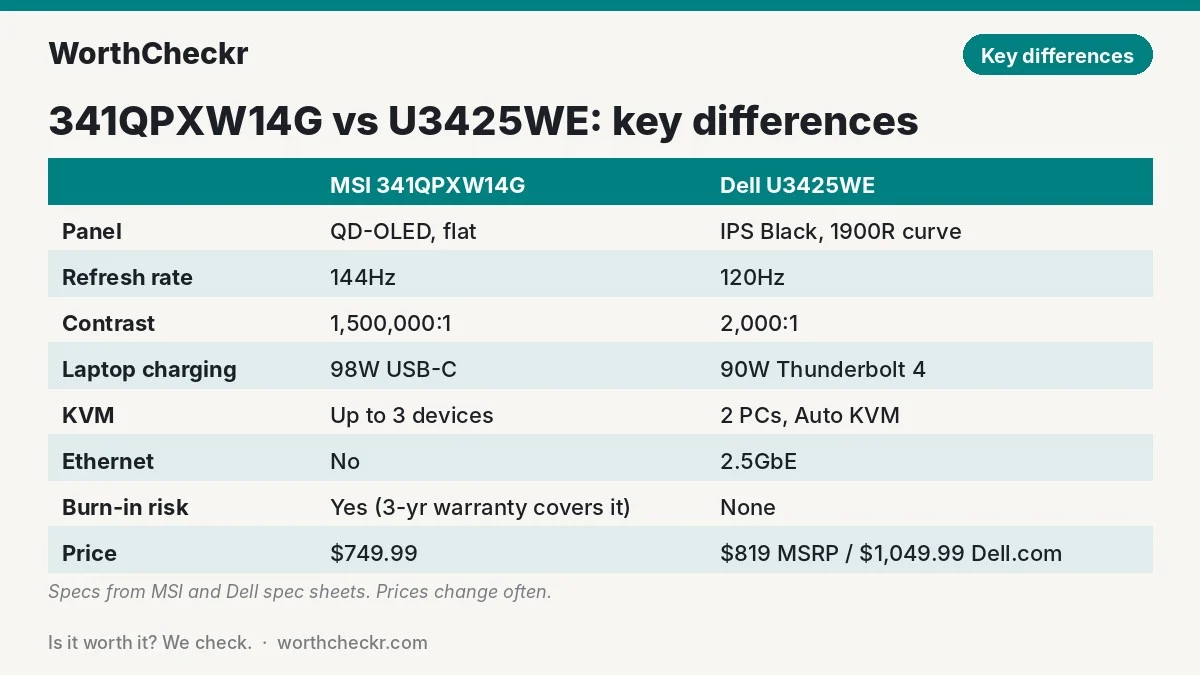
Both screens are 34 inches with the same 3440 x 1440 resolution, so on paper they show the same amount of work. The differences are in the panel, the shape and what’s in the hub.
| Spec | MSI PRO MAX 341QPXW14G | Dell UltraSharp U3425WE |
|---|---|---|
| Panel | 5th-gen QD-OLED, RGB stripe | IPS Black |
| Shape | Flat | Curved, 1900R |
| Resolution | 3440 x 1440 (about 110 PPI) | 3440 x 1440 (about 110 PPI) |
| Refresh rate | 144Hz | 120Hz |
| Contrast | 1,500,000:1 (OLED) | 2,000:1 |
| Brightness | 300 nits SDR, 1,300 nits HDR peak | 300 nits |
| HDR | VESA DisplayHDR True Black 500 | Limited (edge-lit, no local dimming) |
| Color (claimed) | 99% DCI-P3, Delta E ≤2, Pantone Validated | 98% DCI-P3, 100% sRGB |
| Laptop charging | 98W USB-C (plus a second 15W USB-C) | 90W Thunderbolt 4 |
| Video inputs | 2x HDMI 2.1, DP 1.4a, 2x USB-C | Thunderbolt 4, HDMI 2.1, DP 1.4 |
| USB hub | 4x USB-A 5Gbps | 5x USB-A 10Gbps, 2x USB-C 10Gbps, TB4 downstream |
| Ethernet | No | 2.5GbE |
| KVM | Up to 3 devices | 2 PCs, with Auto KVM |
| Speakers | 2x 3W | 2x 5W |
| Stand | 130mm height, tilt, ±30° swivel, ±10° pivot | 150mm height, tilt, swivel |
| Warranty | 3 years, including burn-in | 3 years, Advanced Exchange |
| Price | $749.99 (MSI store) | $819 launch MSRP; $1,049.99 on Dell.com now |
Specs come from MSI’s datasheet and Dell’s product page. MSI’s US product page lists up to 150mm of height travel, while its datasheet says 130mm; we’ve used the more conservative figure.
Reviewer scorecard: who wins each round
This table combines findings from several named reviewers and spec sheets into one place, round by round.
| Category | Winner | What reviewers said |
|---|---|---|
| Contrast and HDR | MSI | OLED’s per-pixel light control beats any IPS. Windows Central’s Rebecca Spear listed “no true HDR” as a U3425WE downside. |
| Text clarity | Tie | Same 110 PPI. KitGuru’s Dominic Moass found MSI’s new RGB stripe QD-OLED layout fixes the old color fringing; the Dell’s IPS has never had it. |
| Color accuracy | Tie | HotHardware’s Thiago Trevisan measured an average Delta E of 0.14 on the Dell. MSI promises Delta E ≤2 and Pantone validation. |
| Bright rooms | Dell | KitGuru noted 5th-gen QD-OLED blacks still look dark grey under strong light, even with MSI’s new coating. |
| Static, all-day work | Dell | No burn-in risk at all. Evetech’s guide stresses that tandem OLED reduces but doesn’t remove image retention risk. |
| Laptop docking | Dell | Thunderbolt 4, 2.5GbE and fast USB. Techaeris’ Alex Hernandez praised it for cutting out dongles and hubs. |
| Multi-device KVM | MSI | Three devices versus two, plus two USB-C ports so two laptops each get one-cable video and data. |
| Mac friendliness | MSI | M-Sync lets Mac keys control brightness and volume. HotHardware flagged missing Mac volume control on the Dell. |
| Price | MSI | $749.99 versus a Dell that launched at $819 and is $1,049.99 on Dell.com today. |
| Buyer sentiment | Dell | 4.5/5 from 535 reviews on Dell.com. The MSI is too new to have a meaningful owner rating yet. |
| Overall | MSI (narrowly) | Better screen, more devices and a lower price, as long as burn-in coverage gives you peace of mind. |
Where reviewers agree
- Both are true work monitors. Each has a height-adjustable stand, a KVM, high-wattage USB-C charging and a matte, low-reflection finish. Neither is a gaming screen with an office sticker.
- 3440 x 1440 is the sweet spot for 34 inches. You get roughly the width of two 1720-pixel windows side by side without scaling headaches on Windows.
- Text is good, not Retina-sharp. At about 110 PPI, neither matches a 27-inch 5K on a Mac. Evetech’s launch guide points out the MSI isn’t a Retina-density screen, and one Alza buyer returned a U3425WE after moving from a sharper 27-inch 4K.
- The built-in speakers are fine for calls. Techaeris and Windows Central both found the Dell’s speakers good enough for meetings and podcasts but weak for music. The MSI’s 3W pair is smaller still.
Where they differ: QD-OLED vs IPS Black picture
This is the biggest gap. The MSI’s QD-OLED panel turns each pixel fully off for black, so dark-mode apps, video calls in dim rooms and photos look far richer. Its rated contrast is 1,500,000:1, against 2,000:1 for the Dell’s IPS Black. That Dell figure is good for an LCD (roughly double ordinary IPS), but a lit room still shows a faint glow in its blacks. Two Alza buyers also mentioned slightly lighter corners from the edge backlight.
MSI’s panel is also the new kind of QD-OLED. Earlier Samsung QD-OLED screens used a triangular subpixel layout that put colored fringes on text, the main complaint office users had about them. Tom’s Hardware’s Brandon Hill reported that the fifth-gen RGB stripe layout is designed to give sharper text, and KitGuru’s Dominic Moass, reviewing MSI’s gaming ultrawide built on the same panel generation, concluded text clarity is no longer something to worry about. MSI says the PRO MAX uses that RGB stripe design too.
The Dell fights back in bright rooms. Moass found that even with the new anti-reflection film, QD-OLED blacks look like a dark grey under strong light, while an IPS matte coating doesn’t shift that way. If your desk faces a sunny window, the OLED’s contrast advantage shrinks during the day.
Curve or flat? The Dell’s 1900R curve keeps the far edges of a 32-inch-wide screen at a more even distance from your eyes, which many people like for spreadsheets. The MSI is flat, which keeps straight lines straight for design and photo work and suits shallow desks where you sit further back.
Where they differ: burn-in and all-day static work
Burn-in is the reason an IPS screen still makes sense for some home offices. A taskbar, Slack sidebar or Excel ribbon on screen for 8 to 10 hours a day, five days a week, is the toughest workload an OLED faces. The Dell has no such risk.
MSI tackles this in three ways. Its OLED Care 3.0 uses an AI Care Sensor that dims the screen when it detects static content or that you’ve walked away. The panel’s mandatory refresh cycle has been stretched to 24 hours and can run in standby. And the 3-year warranty explicitly covers burn-in, which matters more than any feature. Evetech’s launch guide still advises following the maintenance cycle and varying what’s on screen, because tandem OLED reduces wear but doesn’t eliminate it.
A setup tip specific to the MSI: on a 34-inch ultrawide, the taskbar and app sidebars stretch across a wider, more static strip than on a 27-inch screen. Set the Windows taskbar or macOS Dock to auto-hide, use dark mode in Outlook, Teams and Slack, and don’t skip the refresh prompts. For more on burn-in testing and settings, see our guide to whether an OLED monitor is worth it for office work.
Where they differ: KVM, Thunderbolt and Ethernet
The Dell is the better dock. Its Thunderbolt 4 port carries video, 90W charging and data in one cable, and the monitor adds 2.5GbE Ethernet with MAC address pass-through and Wake on LAN, which corporate IT teams often require. You also get five 10Gbps USB-A ports, two 10Gbps USB-C ports and a Thunderbolt 4 downstream port. HotHardware called it a “jack of all trades,” and Techaeris rated it a top pick for connectivity.
The MSI is the better switcher. It has two USB-C inputs, one with 98W charging and one with 15W, plus a USB-B upstream, so its KVM can share one keyboard and mouse across three devices. MSI also advertises cross-device drag-and-drop file transfer. That said, its USB hub runs at 5Gbps and there’s no Ethernet port, so a work laptop that needs wired networking will still need a dongle.
One known Dell quirk: Windows Central found its KVM wanted a USB-A keyboard, and a Dell Community thread reports about five seconds to switch between laptops. We cover KVM switching speeds in our best monitor with KVM switch for working from home guide.
Where they differ: price and value
Prices are where the MSI pulls ahead. Here’s the price-per-feature math using today’s listed prices:
- Per KVM device: the MSI works out to about $250 per connected device ($749.99 ÷ 3). The Dell is about $410 per device at its $819 launch MSRP, or about $525 at Dell.com’s current $1,049.99.
- The Thunderbolt and Ethernet premium: you pay roughly $70 more (launch MSRP) to $300 more (Dell.com today) for the Dell’s Thunderbolt 4, 2.5GbE and faster USB hub. If you’d otherwise buy a $150–$250 Thunderbolt dock, the Dell’s premium partly pays for itself.
- The burn-in insurance: MSI includes 3 years of burn-in cover at no extra cost, so you aren’t paying more for the OLED’s main risk.
The Dell’s price swings a lot. HotHardware and Techaeris saw it at $769.99 in 2024, a Best Buy listing shows $861.43, and Dell.com currently lists $1,049.99. If you find it under $770, the value gap narrows considerably. Prices change often, so check both before you buy.
What buyers and owners are saying
Dell U3425WE. Owner feedback is plentiful and mostly positive. Dell.com shows 4.5 out of 5 from 535 reviews. On Alza, buyers praise sharp images, the replace-two-monitors width for coding, the KVM and one-cable laptop charging. The repeat complaints are lighter corners from edge backlighting, text that looks soft if you’re coming from a 27-inch 4K, no Mac volume control through the speakers, and the price. Windows Central also noted short included USB cables and no portrait rotation.
MSI PRO MAX 341QPXW14G. Owner feedback is thin because the monitor only went on sale in mid-September 2026. MSI’s own store shows no customer ratings yet, and launch coverage from Notebookcheck’s Sambit Saha, Club386’s Fahd Temsamani and KitGuru’s João Silva is based on MSI’s specs rather than long-term use. We’ll update this section as owner reviews build up. Until then, the burn-in warranty and MSI’s 30-day return window are your safety net.
Our take: why the MSI gets the edge
- It’s the better screen for less money. Deep OLED contrast, true HDR and Pantone-validated color for $749.99 beats an IPS panel that has mostly sold for more.
- The biggest OLED objection is covered. RGB stripe subpixels address text fringing, and the 3-year burn-in warranty addresses wear.
- It fits how hybrid workers actually work. A work laptop, a personal laptop and a desktop can share one keyboard and mouse, and Mac users get native brightness and volume keys.
- The Dell’s wins are real but narrower. Thunderbolt, Ethernet and zero burn-in risk matter a lot to some people, and the which should you buy table below flags exactly who.
This mirrors what we found in Dell U3226Q vs U3225QE, with one difference: there, the OLED cost much more than the IPS Black model. Here, the OLED is the cheaper one.
341QPXW14G vs U3425WE: which should you buy?
| If you… | Buy |
|---|---|
| Work 8+ hours a day with the same apps docked on screen | Dell U3425WE |
| Switch between three devices (work laptop, personal laptop, PC) | MSI 341QPXW14G |
| Need wired Ethernet or a Thunderbolt dock for a work laptop | Dell U3425WE |
| Use a MacBook as your main computer | MSI 341QPXW14G |
| Watch films, edit photos or game after work | MSI 341QPXW14G |
| Have a bright, sunny home office | Dell U3425WE |
| Want the best value at today’s prices | MSI 341QPXW14G, or the Dell if it drops below about $770 |
Check MSI PRO MAX 341QPXW14G price → Check Dell U3425WE price →
Want more screen than 34 inches? Our Samsung ViewFinity S8 vs Dell U4025QW comparison covers 40-inch 5K2K ultrawides, which are noticeably sharper. Mac users who care most about text should also read 4K vs 5K monitor for Mac before settling on 110 PPI.
Accessories for a 34-inch ultrawide home office
- Monitor arm: both use a 100 x 100mm VESA mount. The MSI weighs 8.6kg (about 19 lb) with its stand, so choose an arm rated well above the panel’s weight. Check ultrawide monitor arm prices
- A proper USB-C or Thunderbolt cable: anything above 60W needs a 5A e-marked cable to charge at full speed. Check Thunderbolt 4 cable prices
- USB-C to Ethernet adapter (MSI only): if your work laptop needs a wired connection. Check 2.5GbE adapter prices
- A wide enough desk: the MSI is about 82cm (32.2 inches) wide. A standing desk at least 48 inches wide leaves room for a laptop beside it; see our best standing desks for dual monitors, which also suit heavy ultrawides.
341QPXW14G vs U3425WE FAQ
Is the MSI PRO MAX 341QPXW14G curved?
No. MSI’s datasheet lists it as a flat 34-inch panel. The Dell U3425WE is curved at 1900R, so choose the Dell if you specifically want a curve.
Does the MSI 341QPXW14G have Thunderbolt?
No. It has two USB-C ports with DisplayPort Alt Mode, one with 98W charging and one with 15W, which works with Thunderbolt laptops, including MacBooks. It doesn’t offer Thunderbolt daisy-chaining, Ethernet or a 10Gbps hub like the Dell.
Will the MSI 341QPXW14G get burn-in from office work?
Any OLED can, especially with static taskbars and sidebars. MSI reduces the risk with OLED Care 3.0 and a 24-hour refresh cycle, and its 3-year warranty covers burn-in. Auto-hiding the taskbar and using dark mode helps further.
Can the Dell U3425WE charge a MacBook Pro?
Yes, at up to 90W over Thunderbolt 4. That’s enough for 14-inch MacBook Pros and most work laptops. A 16-inch MacBook Pro under heavy load may charge slowly, and the MSI’s 98W port gives slightly more headroom.
Is 3440 x 1440 sharp enough on a 34-inch monitor for a Mac?
It’s usable but not Retina-sharp at about 110 PPI. Many Mac owners are happy with it for email and browsing, but if you read and write all day, a 27-inch 5K or a 40-inch 5K2K ultrawide will look crisper.
Which is better for two computers, the 341QPXW14G or U3425WE?
For two laptops, both work. The MSI handles up to three devices and gives each laptop its own USB-C input, while the Dell adds Auto KVM, picture-by-picture and Ethernet for a corporate laptop.
Verdict
Winner: MSI PRO MAX 341QPXW14G. For most people working from home, it’s the better 34-inch ultrawide: a richer QD-OLED picture, a three-device KVM, Mac-friendly controls and a 3-year burn-in warranty for $749.99. The Dell UltraSharp U3425WE is still the safer choice if your screen shows the same apps all day, your desk sits in bright sun, or you need Thunderbolt and wired Ethernet in one cable. And if the Dell drops below about $770, it becomes a much closer call.
The MSI is new, so we’ll update this comparison as owner feedback and full reviews come in.
Check MSI PRO MAX 341QPXW14G price → Check Dell U3425WE price →
Browse more monitor guides and head-to-head comparisons.
Sources: MSI datasheet · MSI announcement · MSI US Store · Notebookcheck · Club386 · KitGuru (launch) · KitGuru (5th-gen QD-OLED review) · Tom’s Hardware · Evetech · Dell.com · HotHardware · Windows Central · Techaeris · Alza buyer reviews · Dell Community