WorthCheckr pick: Samsung ViewFinity S8 (40-inch, S85TH)
✓ Worth it for Windows laptop and desktop users who want one big screen instead of two
- Same sharp 5120 x 2160 resolution as the Dell for less: $1,399.99 vs $2,399.99 on Dell.com, though other stores sell the Dell for about $1,425–$1,500
- Thunderbolt 5 with 140W charging, plus a faster 144Hz refresh rate
- Higher rated contrast (3,000:1 vs 2,000:1) for deeper-looking blacks
- Reviewers at Techaeris and AppleInsider praise it as a one-cable desk hub
Mac owner? Read the Thunderbolt section first: the Dell is the safer buy for M4/M5 MacBook Pros right now.
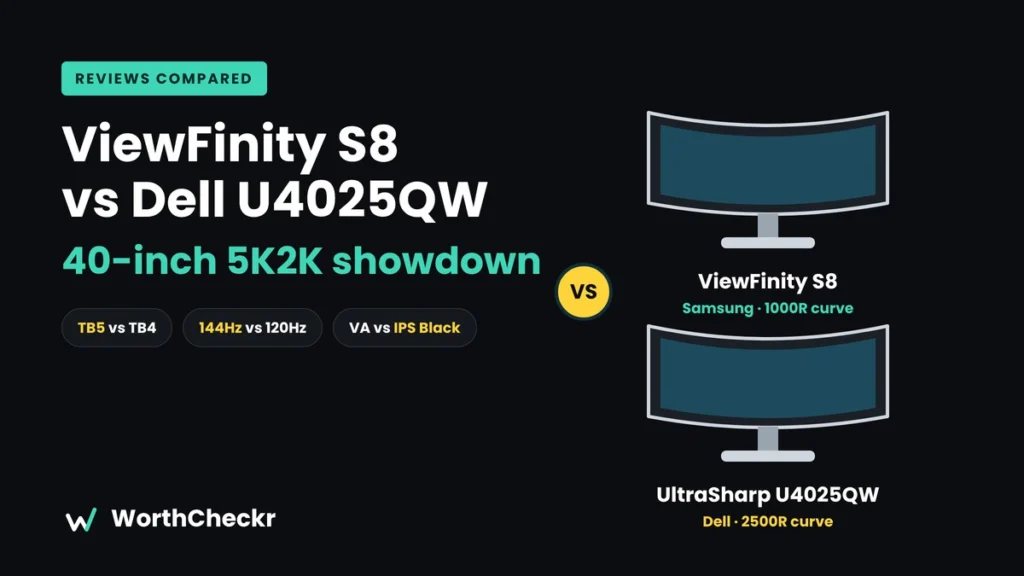
The ViewFinity S8 vs Dell U4025QW question has become one of the more interesting monitor decisions of 2026. Samsung’s 40-inch ViewFinity S8 (model S85TH) is one of the first work monitors you can actually buy with Thunderbolt 5, and it lists for $1,399.99. Dell’s UltraSharp 40 (U4025QW) has been the default 40-inch 5K2K pick since 2024. Dell’s own store now lists it at $2,399.99, but B&H, Adorama and Newegg sell it for about $1,425–$1,500, so shop around.
Fresh reviews keep landing (iPhone in Canada published one on October 9), and Samsung’s fall Prime Day discount briefly dropped the S8 to $999.99. At the same time, a growing Samsung Community thread shows Mac owners fighting Thunderbolt dropouts. So which one is worth it for your home office? We pulled together expert reviews, official specs and owner reports to find out.
New to buying a home office monitor? Start with our guide to choosing a monitor for working from home, which links every WorthCheckr monitor pick and comparison.
In this guide
- ViewFinity S8 vs Dell U4025QW: the quick answer
- ViewFinity S8 vs Dell U4025QW specs side by side
- Reviewer scorecard: who wins each round
- Where reviewers agree
- Where they differ: Thunderbolt 5 vs a proven Thunderbolt 4 hub
- Where they differ: VA contrast vs IPS Black color
- Where they differ: the 1000R curve vs 2500R
- What buyers and owners are saying
- Our take: why the ViewFinity S8 gets the edge
- Which 40-inch monitor should you buy?
- Accessories for a 40-inch ultrawide desk
- ViewFinity S8 vs Dell U4025QW FAQ
- Verdict: the best 40-inch work-from-home monitor for you
ViewFinity S8 vs Dell U4025QW: the quick answer
Both monitors are 40-inch curved ultrawides with the same 5120 x 2160 (“5K2K”) resolution. That works out to about 140 pixels per inch, which is sharp enough for crisp text on Windows and macOS. The differences are in price, ports, panel type and reliability.
- Choose the Samsung ViewFinity S8 if… you want the most screen for the money, you use a Windows laptop or desktop, you like a deeper curve, and you want Thunderbolt 5 for the future.
- Choose the Dell UltraSharp U4025QW if… you work on an M4 or M5 MacBook Pro, you need brighter and more color-accurate images, you share the screen with someone sitting beside you, or you want a 3-year warranty with advance exchange.
Check Samsung ViewFinity S8 40″ price at Samsung → Check Dell U4025QW price at Dell → Check Dell U4025QW price at B&H →
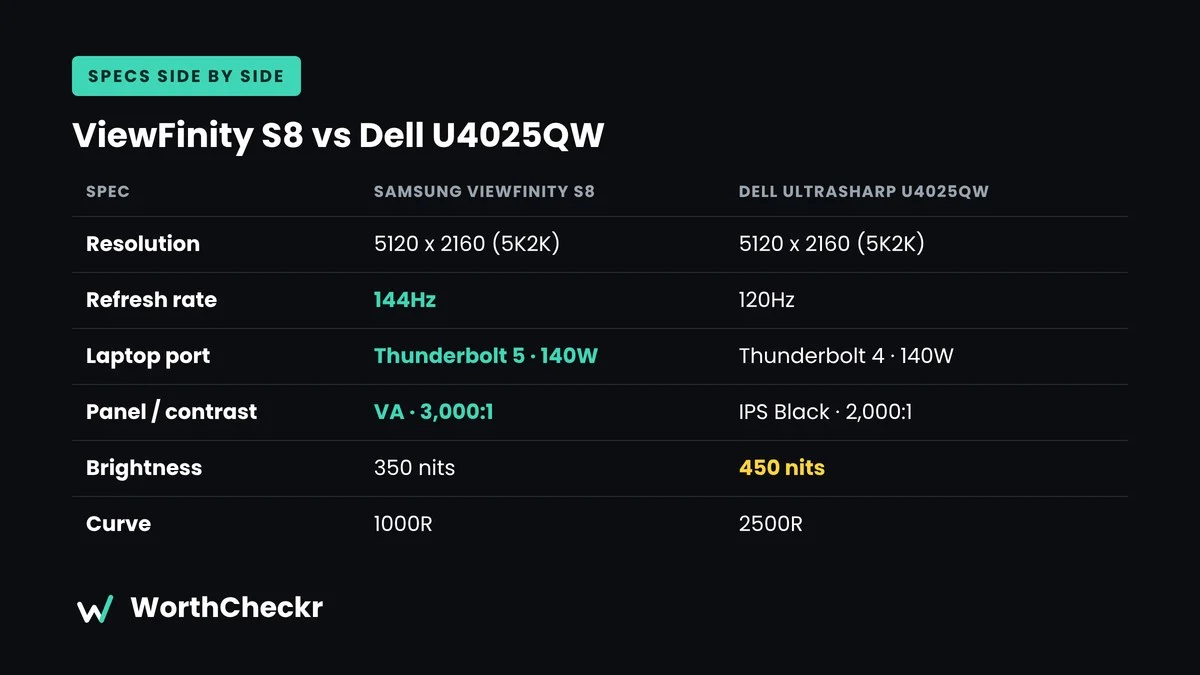
ViewFinity S8 vs Dell U4025QW specs side by side
Specs below come from Samsung’s US product page, TFTCentral’s launch report and Dell’s US product page. Prices were checked on October 19, 2026 and change often.
| Spec | Samsung ViewFinity S8 (S85TH) | Dell UltraSharp U4025QW |
|---|---|---|
| List price (official store) | $1,399.99 | $2,399.99 |
| Price at other US retailers | Check current deals (sale low: $999.99) | About $1,425–$1,650 (Adorama, Newegg, B&H, Best Buy) |
| Screen | 40″ curved, 1000R | 40″ class (39.7″ viewable), curved, 2500R |
| Resolution | 5120 x 2160 (21:9) | 5120 x 2160 (21:9) |
| Panel type | VA | IPS Black |
| Refresh rate | 144Hz, FreeSync Premium | 120Hz |
| Rated contrast | 3,000:1 | 2,000:1 |
| Brightness (typical) | 350 nits | 450 nits (600 peak) |
| Color gamut | 99% sRGB | 100% sRGB, 98% Display P3 |
| HDR | HDR10 / HDR10+ (no local dimming) | VESA DisplayHDR 600 |
| Main laptop port | Thunderbolt 5 (80Gbps), up to 140W charging | Thunderbolt 4, up to 140W charging |
| Other video inputs | HDMI 2.1, DisplayPort 1.4 | HDMI 2.1, DisplayPort 1.4, USB-C upstream |
| Hub | 5x USB-A, 1x USB-C, Ethernet, Thunderbolt 5 out (daisy chain) | 5x USB-A, 2x USB-C, 2.5GbE Ethernet, Thunderbolt 4 out |
| KVM switch | Yes | Yes |
| Speakers | 2 x 5W | 2 x 9W |
| Stand | Height, tilt, swivel | Height, tilt, swivel |
| Webcam | None listed | None |
| Warranty (US) | Check Samsung’s listing | 3 years, Advanced Exchange Service |
Reviewer scorecard: who wins each round
| Category | Winner | What reviewers said |
|---|---|---|
| Price and value | Samsung (narrowly) | Dell’s own store price is $1,000 higher, but third-party retailers shrink the gap to roughly $25–$250. PCWorld’s Matthew S. Smith called the Dell “very expensive” at launch. |
| Text sharpness | Tie | Same 5K2K resolution. Techaeris and PCWorld both say text looks crisp at normal desk distance. |
| Contrast | Samsung | The S8’s VA panel is rated at 3,000:1. PCWorld measured the Dell at about 2,050:1, which is strong for IPS but behind VA. |
| Brightness and color | Dell | PCWorld measured roughly 408 nits SDR and wide color coverage on the Dell. Techaeris says the Samsung’s 350 nits can struggle near sunny windows. |
| Ports and future-proofing | Samsung | Thunderbolt 5 at 80Gbps. AppleInsider’s Andrew Orr says it can replace a dock, Ethernet adapter and KVM. |
| Viewing angles | Dell | Techaeris flags the S8’s narrower VA viewing angles for off-center viewing. |
| Speakers | Dell (narrowly) | Techaeris found Samsung’s speakers fine for calls but harsh at high volume. Dell’s are higher-wattage. |
| Mac reliability | Dell | Many S8 owners on M4/M5 Macs report Thunderbolt 5 blackouts. Samsung had not released a fix as of October 19. |
| Buyer sentiment | Dell | 4.6/5 from 1,005 ratings on Dell.com vs 4.4/5 from 113 on Samsung.com. |
| Overall | Samsung (for most buyers) | Better value and newer connectivity. The Dell is the safer pick for Mac users and color-sensitive work. |
Where reviewers agree
- One 40-inch 5K2K screen really can replace two monitors. iPhone in Canada’s Steve Vegvari says the S8 makes extra screens unnecessary. TechRadar’s Collin Probst says much the same about the Dell’s room for multitasking. If you’re still weighing one wide screen against a pair, our ultrawide vs dual monitors for work guide runs the pixel and desk-width math.
- Single-cable laptop setups are the killer feature. Both charge a laptop at up to 140W while carrying video, USB and Ethernet over one cable.
- The built-in KVM is useful for people with two computers. If you have a work laptop and a personal PC, one keyboard and mouse can control both.
- Neither one is an HDR showpiece. Neither has the local dimming or OLED you’d want for HDR movies. PCWorld called the Dell’s HDR weak, and Techaeris calls the Samsung’s HDR basic. If OLED contrast matters to you, see our AW3226Q vs XG32UQWMS comparison for working from home.
- They’re big. Both need a deep desk. Reviewers mention the S8’s footprint and weight, about 14 kg with the stand, per iPhone in Canada.
Where they differ: Thunderbolt 5 vs a proven Thunderbolt 4 hub
On paper, the Samsung’s Thunderbolt 5 port is the bigger upgrade. It offers 80Gbps of bandwidth, enough headroom for faster docks and drives, and you can daisy-chain from it. Dell’s Thunderbolt 4 hub is older tech, but it’s well proven and has a richer set of USB-C ports for accessories.
The catch is reliability on Macs. A Samsung Community thread that began in July 2026 collects reports from MacBook Pro owners with M4 Pro, M4 Max and M5 Pro chips. They say the screen keeps going black over Thunderbolt 5 while the connection stays up. At least 18 owners added “me too” replies. One user said a motherboard replacement didn’t fix it, and another said the firmware Samsung posted was the same version they already had.
The workarounds owners share are real compromises. You can use HDMI 2.1 (but lose the hub). Or you can use a USB-C display cable, which one owner said limits you to 120Hz and about 90W of charging. A reader comment on iPhone in Canada’s review mentions the same issue. We haven’t seen widespread reports from Windows users, but owner feedback is still limited because the monitor is fairly new.
Fix status (October 19, 2026): Samsung hasn’t released a fix. The only firmware on its support page is version 1001.0 from September 8, and an owner running that version reported the problem again on October 10. A Samsung moderator replied on October 11 that the report had gone to Samsung’s product development and firmware engineering teams for investigation, but gave no timeline. We’ll update this section when a fix ships.
Bottom line: if you plug in an M4 or M5 MacBook Pro or Mac mini every day, the Dell is the lower-risk choice until Samsung ships a confirmed fix.
Where they differ: VA contrast vs IPS Black color
The Samsung uses a VA panel. VA’s strength is contrast, so dark windows, terminals and video look deeper. The trade-off is viewing angles: colors and brightness shift more when you look from the side.
The Dell uses LG’s IPS Black technology. It roughly doubles the contrast of a typical IPS panel while keeping IPS’s wide viewing angles and better color coverage. PCWorld measured about 96% of DCI-P3 and called the Dell’s color accuracy good, though not class-leading. If you do photo editing, design or brand work alongside spreadsheets, the Dell is the better tool. For email, docs, coding and calls, both look great.
Where they differ: the 1000R curve vs 2500R
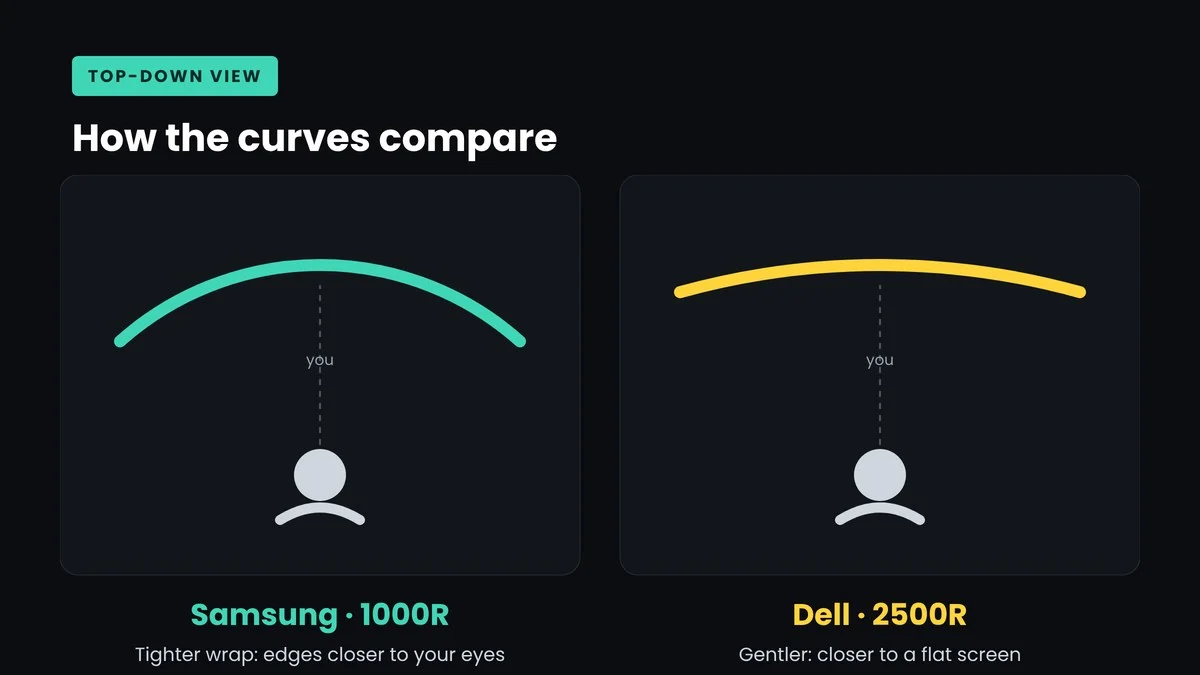
A lower “R” number means a tighter curve. Samsung’s 1000R wraps the screen around you, which keeps the far edges closer to your eyes. Techaeris calls it “aggressive” and likes it for multitasking. Dell’s 2500R is gentler and feels more like a flat screen. That’s easier for straight lines in design work and for showing your screen to a colleague. One Dell owner on Reddit even said they wished it had more curve, so this really comes down to taste.
What buyers and owners are saying
- Dell U4025QW: It has a long track record, with 1,005 ratings averaging 4.6/5 on Dell.com. Reddit owners (collected by RedditRecs) praise the text clarity on macOS, the Thunderbolt hub and the KVM. Complaints center on price, tricky scaling at native resolution, and it not being a serious gaming monitor.
- Samsung ViewFinity S8: It averages 4.4/5 from 113 ratings on Samsung.com, so there’s far less owner data so far. Fans like the price, the 144Hz smoothness and the one-cable setup. The loudest complaint by far is the Mac Thunderbolt 5 blackout issue covered above.
Because the S8 is newer, expect its owner picture to change as more people buy it and Samsung responds on firmware.
Our take: why the ViewFinity S8 gets the edge
- Value. You get the same 5K2K resolution and the same 140W single-cable charging for less money. The S8 is $1,000 under Dell’s own list price. Discounts at B&H, Adorama and Newegg narrow that to about $25–$100, but Samsung’s sale price has dipped as low as $999.99.
- Newer connectivity. Thunderbolt 5 and 144Hz give it more headroom than the Dell’s Thunderbolt 4 and 120Hz.
- Contrast. For everyday office work and evening video, the VA panel’s 3,000:1 contrast is a visible plus.
- Reviewers like it. Techaeris gave it 9.3/10, and AppleInsider says it fixes things Apple’s own displays still lack.
- But it’s not for everyone. The Dell wins on reliability, warranty, brightness and color. Mac users on M4/M5 hardware should buy the Dell for now.
Which 40-inch monitor should you buy?
| If you… | Buy |
|---|---|
| Use a Windows laptop or desktop and want the best value | Samsung ViewFinity S8 |
| Use an M4 or M5 MacBook Pro or Mac mini every day | Dell UltraSharp U4025QW |
| Edit photos or do color-sensitive design work | Dell UltraSharp U4025QW |
| Want to game a little after work | Samsung ViewFinity S8 (144Hz) |
| Work in a bright, sunny room | Dell UltraSharp U4025QW |
| Need a long warranty with quick replacement | Dell UltraSharp U4025QW |
| Want to future-proof for Thunderbolt 5 laptops | Samsung ViewFinity S8 |
Check Samsung ViewFinity S8 40″ price at Samsung → Check Dell U4025QW price at Dell → Check Dell U4025QW price at B&H →
Not sure you need a 40-inch screen at all? A 27-inch 4K USB-C monitor costs far less and suits smaller desks. See our guide to the best 27-inch 4K USB-C monitors for working from home.
Not sure a 40-inch ultrawide suits your desk? A 32-inch 4K screen is the main alternative: see our Dell U3226Q vs U3225QE breakdown for Dell’s 32-inch UltraSharps, or read whether an OLED monitor is worth it for office work. If you want an ultrawide but a smaller, cheaper one, our MSI 341QPXW14G vs Dell U3425WE comparison covers the best 34-inch options.
Accessories for a 40-inch ultrawide desk
- A heavy-duty monitor arm: it frees up desk depth. Check the arm’s weight limit and the monitor’s VESA spec before you buy, because 40-inch screens are heavy. Check ultrawide monitor arm price →
- A certified Thunderbolt cable: a quality, certified cable rules out one common cause of dropouts. Check Thunderbolt 5 cable price →
- An external webcam: neither monitor has one built in, and a laptop’s camera is awkward to use when the laptop is off to the side. Check webcam price →
- A large desk mat: it helps when your mouse needs to travel across a wide screen. Check desk mat price →
Pairing a big monitor with a compact computer? See our M6 Mac mini vs M5 Pro Mac mini comparison, or browse more monitor coverage.
ViewFinity S8 vs Dell U4025QW FAQ
Is a 40-inch 5K2K monitor too big for a home office?
Not if your desk is deep enough. Aim for roughly 30 inches (75 cm) of depth, or use a monitor arm. The extra height over a 34-inch ultrawide is what makes these feel like two 27-inch screens side by side.
Does the Samsung ViewFinity S8 work with MacBooks?
Yes, but many owners with M4 and M5 MacBook Pros report the screen blacking out over Thunderbolt 5. HDMI or a USB-C display cable are workarounds with trade-offs. As of October 19, Samsung hadn’t released a fix, so check for firmware newer than version 1001.0 before buying.
Do I need Thunderbolt 5?
Not today for most office work. Thunderbolt 4 already handles 5K2K video, 140W charging and a USB hub. Thunderbolt 5 mainly adds headroom for faster accessories and future laptops.
Is a VA panel OK for work?
Yes. VA gives higher contrast, which is great for text and dark-mode apps. The downside is narrower viewing angles, which matter more if you share the screen or do color-critical work.
Can a laptop drive 5K2K at 120Hz or 144Hz?
Many recent laptops can, but it depends on the GPU and port. Check your laptop’s external display specs. For office work, even 60Hz at full resolution is perfectly usable.
Is the Dell U4025QW worth the higher price?
It’s worth it if you value proven Mac compatibility, better color and brightness, and a 3-year advance-exchange warranty. If you don’t need those, the Samsung gives you most of the experience for less money. Avoid paying Dell.com’s $2,399.99 list price, though: other major retailers often sell it for around $900 less.
Verdict: the best 40-inch work-from-home monitor for you
Winner: Samsung ViewFinity S8 (40-inch, S85TH), for most home office buyers. It matches the Dell’s 5K2K sharpness and one-cable laptop charging, and adds Thunderbolt 5, 144Hz and higher contrast, usually for less money.
The Dell UltraSharp U4025QW is still the safer premium pick. Buy it if you’re on an M4 or M5 Mac, work with color, or want Dell’s warranty. We’ll update this comparison as more owner feedback comes in, especially on whether Samsung fixes the Mac Thunderbolt issue.
Check Samsung ViewFinity S8 40″ price at Samsung → Check Dell U4025QW price at Dell → Check Dell U4025QW price at B&H →
WorthCheckr’s comparisons are research-based. We summarize expert reviews, official specs and owner reports; we didn’t test these monitors hands-on. Prices were checked October 19, 2026 and change often. See How We Test.
Sources: Samsung · Dell · TFTCentral · Techaeris · AppleInsider · iPhone in Canada · PCWorld · TechRadar · RedditRecs · Samsung Community · Samsung Support (firmware) · Samsung Members Community · B&H Photo · Newegg · Best Buy · 9to5Toys