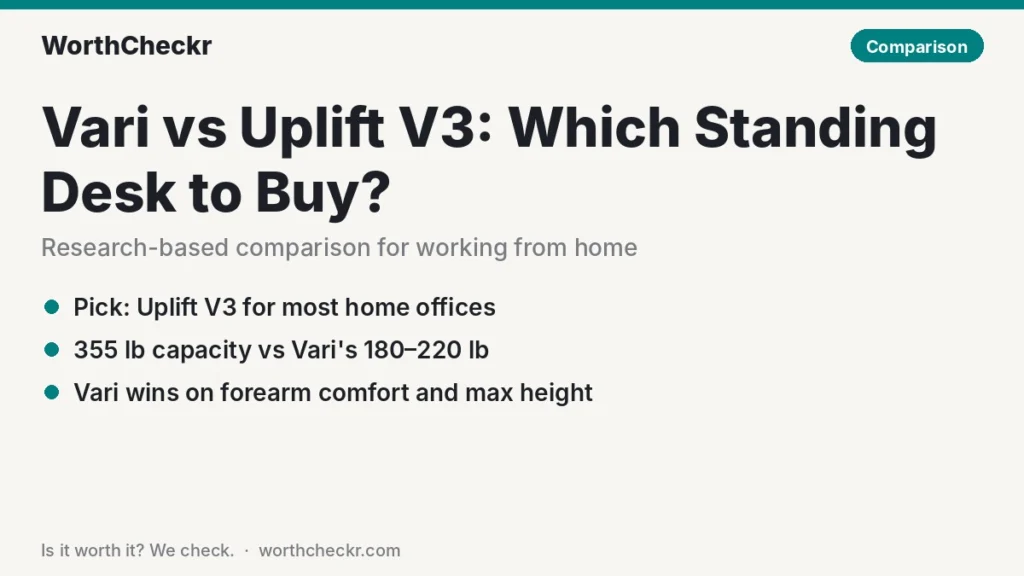
WorthCheckr pick: Uplift V3
✓ Worth it for remote workers who want a rock-steady desk that can carry two monitors, a dock and a desktop PC, and grow with their setup.
- Reviewers at Tom’s Guide and TechRadar both rate its stability as best in class.
- It lifts 355 lb at every size, while the Vari’s limit falls to 180 lb on its 72-inch model.
- Dual motors, a published 2-inch-per-second speed and a 15-year warranty you can extend to 25.
- Far more sizes, tops and accessories, and it often starts for less than the Vari.
Pick the Vari ComfortEdge instead if you rest your forearms on the desk edge all day, you’re tall enough to need a 50-inch-plus top height, or you just want one simple, ready-to-go configuration with a lifetime warranty.
Last updated October 31, 2026 · Research-based analysis by Abid Shehzad, WorthCheckr
Both brands are running holiday sales right now (Vari’s 20% promotion runs to November 18), so plenty of home office buyers are weighing Vari vs Uplift V3 this month. On paper they look alike: two premium electric desks, similar starting prices, both praised by reviewers. Up close they’re built for different people.
The Vari Electric Standing Desk with ComfortEdge is about comfort and simplicity, thanks to a sloped front edge that takes pressure off your forearms. The Uplift V3 is about strength and choice: a dual-motor frame, a big weight rating and a near-endless configurator. It replaced the long-running V2 in 2025; if you’re eyeing a secondhand older model, our Uplift V2 vs V3 breakdown explains what you’d give up. Below, we combine what Tom’s Guide, TechRadar, The Gadgeteer and PC Gamer found with official specs and owner feedback. WorthCheckr hasn’t tested either desk; this is a research-based comparison. New to buying a desk? Our standing desk buying guide covers the basics first.
In this comparison
- Vari vs Uplift V3: the quick answer
- Vari vs Uplift V3 specs side by side
- Reviewer scorecard: who wins each round
- Where reviewers agree
- Where they differ: weight capacity by desk size
- Where they differ: ComfortEdge vs a flat top
- Where they differ: height range for short and tall users
- Where they differ: price, warranty and value
- What buyers and owners are saying
- Our take: why the Uplift V3 gets the edge
- Vari or Uplift V3: which should you buy?
- Accessories for either desk
- Vari vs Uplift V3 FAQ
- Verdict
Vari vs Uplift V3: the quick answer
Choose the Uplift V3 if…
- You run a heavy setup: two or three monitors on arms, a desktop tower, speakers or a laptop dock.
- Wobble at standing height is your biggest worry, especially on video calls.
- You want a specific size (Uplift’s frame adjusts from about 41 to 72 inches wide) or a nicer top.
- You’re shorter and need the desk to sit lower than 25 inches.
Choose the Vari ComfortEdge if…
- You type with your forearms resting on the desk and hate a hard edge digging in.
- You’re tall and want a top height up to 50.5 inches.
- Your setup is light: one or two monitors and a laptop.
- You’d rather pick a size and finish and be done, with a lifetime warranty behind it.
Still deciding between brands more broadly? Our how to choose a standing desk guide walks through motors, size, stability and budget step by step.
Check Uplift V3 price → Check Vari ComfortEdge price →
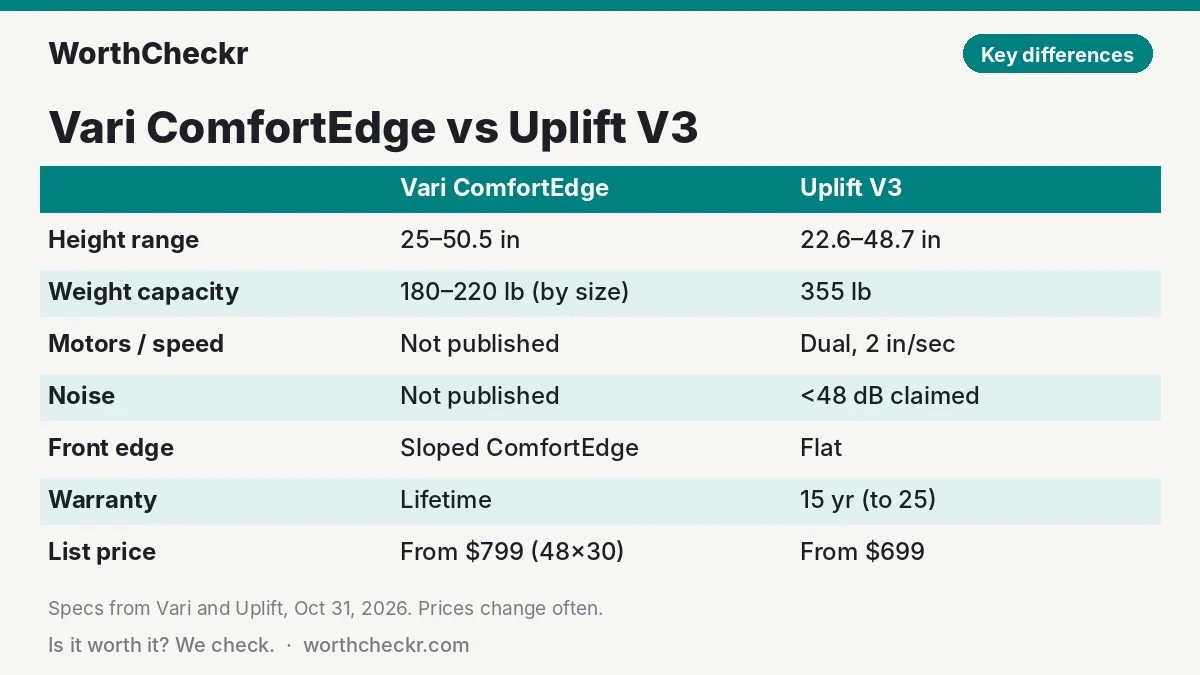
Vari vs Uplift V3 specs side by side
Figures in this Vari vs Uplift V3 spec table come from Vari’s product pages, Uplift’s site and its V3 frame spec sheet. Where a brand doesn’t publish a number, we say so rather than guess.
| Spec | Vari Electric Standing Desk with ComfortEdge | Uplift V3 (2-leg) |
|---|---|---|
| Sizes | 40×26, 48×30, 60×30 and 72×30 in | Frame adjusts 41.3–72.2 in wide; many desktop sizes and depths |
| Height range | 25–50.5 in | 22.6–48.7 in (with a 1 in top) |
| Weight capacity | 220 lb (48×30), 200 lb (60×30), 180 lb (72×30) | 355 lb |
| Motors | Not published (Vari describes “a whisper-quiet motor”) | Dual motors |
| Lift speed | Not published | 2 in per second |
| Noise | Not published; reviewers call it very quiet | Under 48 dB claimed; Tom’s Guide measured a 54 dB peak |
| Desktop | 1.25 in laminate with sloped ComfortEdge front | 1 in laminate standard; 1–1.75 in across top options |
| Memory presets | 4 | Depends on keypad (2–4 on common options) |
| Cable management | Rear cable cutout, cable wraps and hooks included | FlexMount cable tray included |
| Safety | Drop-stop sensor halts lowering if something is underneath | BIFMA-compliant height range |
| Warranty | Lifetime (non-transferable) | 15 years, extendable to 25 |
| List price | $799 (48×30), $899 (60×30), $999 (72×30) | From $699 for a complete 2-leg desk; $569 frame only |
| Holiday sale (Oct 31) | 20% off: $639 / $719 / $799 | Varies by configuration; check Uplift’s site |
Prices change often. Vari’s sale prices are from its site on October 31, 2026 and run until November 18.
Reviewer scorecard: who wins each round
Here’s how the Vari vs Uplift V3 matchup plays out across the reviews and owner reports we read, round by round.
| Category | Winner | What reviewers said |
|---|---|---|
| Stability at standing height | Uplift V3 | Tom’s Guide’s Anthony Spadafora found it steadier than the V2 even fully raised; TechRadar’s Collin Probst called it best in class. |
| Typing comfort | Vari | TechRadar and The Gadgeteer both say the sloped ComfortEdge eases pressure on the forearms. |
| Weight capacity | Uplift V3 | Probst flagged the Vari’s 220 lb limit as a weak spot; the V3 is rated for 355 lb. |
| Quietness | Vari (narrowly) | The Gadgeteer’s Frank Myers called the Vari one of the quietest desks he’d used; Tom’s Guide measured the V3 at 54 dB peak. |
| Assembly | Vari | Probst built his Vari in about 14 minutes; Tom’s Guide needed just under 30 for the V3. |
| Customization | Uplift V3 | Tom’s Guide counts 10 desktop sizes and 30 styles, plus a huge accessory range. |
| Warranty | Vari (on length) | Lifetime coverage vs Uplift’s 15 years, though Uplift’s covers motors, electronics and top in plain terms. |
| Value | Uplift V3 | Probst rated the Vari 4 stars on price; the V3 often starts lower and carries much more weight. |
| Buyer sentiment | Tie | Uplift shows 4.8/5 from more than 17,000 reviews; Vari’s 48×30 page shows 4.76/5 from 132. Owners praise both. |
| Overall (for working from home) | Uplift V3 | Wins the rounds that matter most for a loaded work setup: stability, capacity and value. |
Where reviewers agree
Strip away the marketing and the Vari vs Uplift V3 debate is closer than it looks. The two desks share a lot. Every review we read describes both as well built, smooth and quiet enough for a shared room or a call. Neither is a budget desk, and both feel like it.
- Both are easy to build. Vari ships the frame pre-attached to the desktop, so you mostly bolt on the legs. Uplift pre-assembles the frame and control box and pre-inserts many bolts. Either is a one-evening job at worst, though both are heavy enough that a second person helps when you flip the desk.
- Both are stable for normal use. TechRadar found minimal wobble on the Vari at different heights, and PC Gamer’s Hope Corrigan noted no shaking as it moved. The Uplift simply sets a higher bar.
- Both have memory presets. Save sitting and standing heights and switch with one press.
- Both are premium-priced for their size. Probst marked the Vari down on price, and Tom’s Guide warned that Uplift’s add-ons pile up fast.
So the choice isn’t “good desk vs bad desk”. It comes down to four things: how much weight you’ll put on it, how you rest your arms, how tall you are, and how you value warranty against flexibility.
Where they differ: weight capacity by desk size
This is the Vari vs Uplift V3 difference most comparisons skip, and it matters for anyone running a serious work-from-home rig. Vari’s weight limit drops as the desktop grows. According to Vari’s own listings, the ComfortEdge desk is rated for 220 lb at 48×30, 200 lb at 60×30 and 180 lb at 72×30. The likely reason is simple: the bigger top weighs more, leaving less lifting power for your gear. The Uplift V3 frame is rated for 355 lb regardless of the top you put on it.
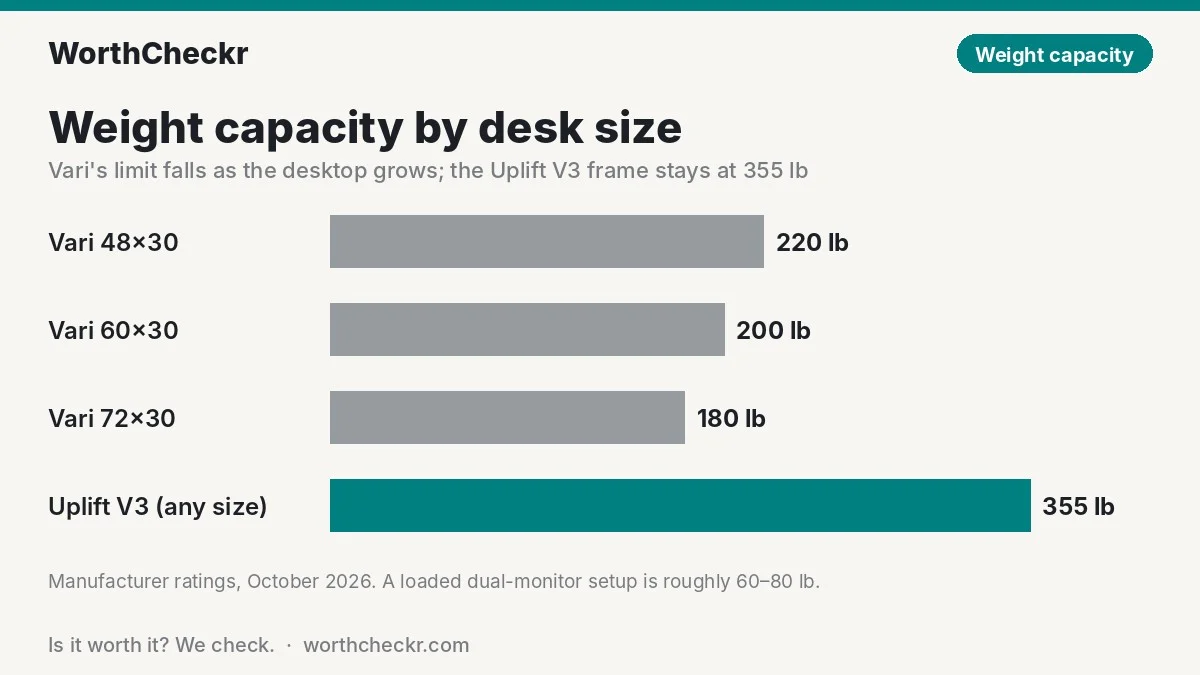
Here’s what that means in practice. A typical dual-monitor home office might hold two 27-inch monitors (about 12–15 lb each with stands), a dual monitor arm (around 15–20 lb), a laptop and dock (8–10 lb), speakers, a lamp and a mug. That’s roughly 60–80 lb, well within either desk’s rating. Add a full-size desktop tower on a shelf, a 49-inch ultrawide or a third screen, and you can creep past 120 lb. On a 72-inch Vari, that’s two-thirds of the limit; on the Uplift, it’s about a third.
Why care if you’re under the limit? A motor working near its ceiling has less margin over years of daily lifts, and can sound strained. And people leaning on the desk while typing adds load too. If you’re planning a wide desk with lots of gear, the Uplift’s headroom is the safer bet. Our best standing desk for dual monitors guide goes deeper on sizing for two screens.
The motor story points the same way. Uplift publishes dual motors and a 2-inch-per-second speed. Vari’s pages mention “a whisper-quiet motor” but don’t list a motor count, speed or decibel figure. If you’re unsure why that matters, our explainer on single vs dual motor standing desks breaks down the trade-offs.
Where they differ: ComfortEdge vs a flat top
The biggest feel difference in Vari vs Uplift V3 is the Vari’s front edge, which curves gently downward instead of ending in a sharp corner. If you type with your forearms on the desk, that slope spreads the pressure. TechRadar’s Probst said it looks deliberate rather than gimmicky, and The Gadgeteer’s Myers was enthusiastic enough to urge readers to try it.
It does come with quirks. Myers found that a deep desk pad doesn’t sit flush on the sloped edge, so his forearms could catch the pad’s lip and nudge it out of place. He also noted that a drink set near the front can slide. Neither is a deal breaker, but if you love a full-width desk mat, keep it a little back from the edge.
The Uplift V3 has a standard flat top, and Uplift sells many desktop materials, from laminate to solid wood. If edge comfort is your main concern, you can add a padded wrist rest or a soft desk mat for far less than the price gap between models. Note too that a 30-inch-deep Vari loses a little usable flat surface to the slope, which matters if you push monitors right to the back on a short arm.
Work-from-home tip: with either desk, set your standing preset so your elbows sit at about 90 degrees with relaxed shoulders. Our standing desk height calculator gives you the exact numbers for your height in seconds.
Where they differ: height range for short and tall users
In the Vari vs Uplift V3 contest, the two desks cover slightly different height bands, and this can settle the decision on its own:
- Vari: 25 to 50.5 inches. The higher top end suits taller people, roughly 6’2″ and up, who need the surface near 47–50 inches when standing.
- Uplift V3: 22.6 to 48.7 inches with a 1-inch top (a thicker top adds a little to both ends). The lower floor suits shorter users who otherwise sit with raised shoulders.
Owners on Reddit back this up. One 6’1″ Uplift owner said the 48.7-inch maximum felt limiting once a walking treadmill was underneath. On the other hand, a desk that won’t drop below 25 inches can leave shorter people reaching up while seated, which is a common cause of shoulder strain. Check your own numbers before you buy; the height calculator linked above takes about ten seconds.
Where they differ: price, warranty and value
List prices overlap in Vari vs Uplift V3, but the value picture differs once you factor in size and capacity. Vari lists the ComfortEdge at $799 (48×30), $899 (60×30) and $999 (72×30), and on October 31 its holiday sale cuts those to about $639, $719 and $799. Uplift lists a complete 2-leg V3 from $699, or $569 for the frame alone if you want your own top.
A quick capacity-per-dollar check using list prices shows the gap clearly:
| Desk (list price) | Weight capacity | Pounds of capacity per $100 |
|---|---|---|
| Vari ComfortEdge 48×30 ($799) | 220 lb | About 28 lb |
| Vari ComfortEdge 72×30 ($999) | 180 lb | About 18 lb |
| Uplift V3 2-leg starting desk ($699) | 355 lb | About 51 lb |
Our calculation from list prices on October 31, 2026. Uplift’s price rises with bigger or premium tops and keypad upgrades, so check your exact configuration.
Real-world quotes can narrow the gap. One Reddit shopper comparing 60×30 desks in 2025 was quoted about $750 for the Vari with a coupon and $858 for the Uplift once options were added. Uplift’s add-ons are where costs climb; one owner called its accessories “wildly expensive” and 3D-printed their own.
On warranty, Vari offers lifetime coverage against defects (non-transferable) plus 30-day free returns. Uplift’s 15-year warranty, extendable to 25, spells out coverage for the frame, motors, electronics and desktop. Either is far beyond what budget desks offer. If your budget tops out lower, our best standing desks under $500 covers strong cheaper options.
What buyers and owners are saying
Owner feedback on Vari vs Uplift V3 is lopsided in volume, but both sides are mostly happy.
Uplift V3 owners most often praise stability. On r/StandingDesk, one owner called it “the sturdiest by far” and said monitors stayed still at standing height. Others mention quiet motors and good support; one described Uplift’s customer service as excellent. The common complaints are price, particle-board laminate tops, the 48.7-inch maximum for tall users, and a little wobble on the 2-leg model when casters are fitted or someone types hard at full height.
Vari owners are a smaller but happy group. Reddit comments describe the desk as well built, with one owner saying theirs has survived several moves since 2020. One Vari buyer said support replaced a desktop damaged in shipping right away. Price is the main complaint, and a few found the 72-inch model too expensive. We found few complaints about reliability, but the owner sample is much smaller than Uplift’s, so treat that as a lighter signal.
Overall, both brands score well with buyers. Uplift’s lead in sheer review volume (more than 17,000 versus 132 on the Vari 48×30 page) gives you more confidence in how it holds up long term.
Our take: why the Uplift V3 gets the edge
- Stability is the reason to buy a premium desk, and the V3 is the one reviewers single out. Two separate Editor’s Choice reviews called it best in class or rock-solid at full height.
- It carries more, at every size. 355 lb versus 180–220 lb gives real headroom for multi-monitor setups and a desktop PC, and the Vari’s rating shrinks exactly when you’d want a bigger desk.
- Published specs. Dual motors, 2 inches per second and a noise rating are all on paper. Vari asks you to take quietness and speed on trust (reviewers do back it up).
- Flexibility. Any width from about 41 to 72 inches, dozens of tops and a huge accessory range means it can fit an awkward alcove or grow into an L-shaped setup.
- Better value in most configurations. It typically starts below the Vari and delivers far more capacity per dollar.
The Vari is still a lovely desk and the better pick for some people. If you rest your arms on the edge all day, you’re tall, or your setup is light and you want lifetime coverage, it makes a strong case. If you’ve already narrowed things to Uplift, see how the V3 stacks up in our Uplift V3 vs FlexiSpot E7 Pro comparison and Secretlab Magnus Pro vs Uplift V3 showdown.
Vari or Uplift V3: which should you buy?
Use this table to settle Vari vs Uplift V3 for your own body, budget and setup.
| If you… | Buy |
|---|---|
| Run two or three monitors on arms plus a desktop tower | Uplift V3 |
| Want a 72-inch-wide desk with lots of gear | Uplift V3 (Vari drops to 180 lb at that size) |
| Type with forearms resting on the desk edge | Vari ComfortEdge |
| Are about 6’2″ or taller | Vari ComfortEdge (tops out at 50.5 in) |
| Are about 5’3″ or shorter | Uplift V3 (drops to 22.6 in) |
| Take lots of video calls and hate screen shake | Uplift V3 |
| Want the fastest, simplest setup and fewest choices | Vari ComfortEdge |
| Want a lifetime warranty | Vari ComfortEdge |
| Want to use your own desktop or an odd width | Uplift V3 frame |
Check Uplift V3 price → Check Vari ComfortEdge price →
Accessories for either desk
- Monitor arm: frees desk space and lets you set screen height separately from the desk. Pair it with one of our best 27-inch 4K USB-C monitors for working from home. Check monitor arm prices
- Anti-fatigue mat: makes standing for longer stretches more comfortable. Check anti-fatigue mat prices
- Under-desk cable tray or spine: keeps cords tidy as the desk moves. The V3 includes a tray; Vari owners may want one. Check cable tray prices
- Wrist rest (Uplift owners): a cheap way to soften a flat front edge. Check wrist rest prices
If your desk shakes after setup, our guide to fixing standing desk wobble has nine fixes, cheapest first.
Vari vs Uplift V3 FAQ
Is Vari or Uplift better for working from home?
For most home offices, the Uplift V3. Reviewers rate its stability higher, it carries 355 lb versus 180–220 lb for the Vari, and it often costs less. The Vari is better if you rest your forearms on the desk edge or need a taller maximum height.
Is the Vari standing desk single or dual motor?
Vari doesn’t publish a motor count for the ComfortEdge desk; its pages describe “a whisper-quiet motor.” The Uplift V3 uses dual motors and lists a 2-inch-per-second lift speed.
How much weight can a Vari standing desk hold?
The ComfortEdge desk is rated for 220 lb at 48×30, 200 lb at 60×30 and 180 lb at 72×30, according to Vari. The Uplift V3 frame is rated for 355 lb.
Is the Vari ComfortEdge worth it?
It’s worth it if you type with your forearms on the desk, since reviewers say the sloped edge relieves pressure. Note that deep desk pads don’t sit flush on the slope, and it costs more per inch than many rivals.
Which desk is better for tall people, Vari or Uplift?
The Vari, narrowly. It rises to 50.5 inches versus 48.7 inches for the Uplift V3 with a 1-inch top. Shorter users get the opposite benefit from the Uplift’s lower 22.6-inch minimum.
Does Vari have a better warranty than Uplift?
Vari offers a lifetime, non-transferable warranty on defects. Uplift offers 15 years, extendable to 25, covering the frame, motors, electronics and desktop. Both are excellent; Vari’s is longer on paper.
Verdict
Winner: Uplift V3. In the Vari vs Uplift V3 matchup, the Uplift is the better standing desk for most people working from home. It’s steadier at full height, it lifts far more weight at every size, it publishes its motor specs and it usually costs less for the capacity you get.
The Vari ComfortEdge earns its place for a specific buyer: someone who rests their forearms on the desk, is on the tall side, keeps a light setup and wants a lifetime warranty with no configuring. With Vari’s 20% sale running until November 18, a 48×30 ComfortEdge at about $639 is a good deal for that person.
We’ll update this comparison as more owner feedback and pricing changes come in.
Check Uplift V3 price → Check Vari ComfortEdge price →
More from WorthCheckr: browse all standing desk coverage and our head-to-head comparisons.
Sources: Vari (48×30 ComfortEdge) · Vari (72×30 ComfortEdge) · Uplift Desk · Uplift V3 frame spec sheet · Tom’s Guide · TechRadar (Uplift V3) · TechRadar (Vari) · The Gadgeteer · PC Gamer · RedditRecs (Uplift V3 owners) · RedditRecs (Vari owners)